Tell your story at your pace  ͏  ͏  ͏  ͏  ͏  ͏  ͏  ͏  ͏  ͏  ͏  ͏  ͏  ͏  ͏  ͏  ͏  ͏  ͏  ͏  ͏  ͏  ͏  ͏  ͏  ͏  ͏  ͏  ͏  ͏  ͏  ͏  ͏  ͏  ͏  ͏  ͏  ͏  ͏  ͏  ͏  ͏  ͏  ͏  ͏  ͏  ͏  ͏  ͏  ͏  ͏  ͏  ͏  ͏  ͏  ͏  ͏  ͏  ͏  ͏  ͏  ͏  ͏  ͏  ͏  ͏  ͏  ͏  ͏  ͏  ͏  ͏  ͏  ͏  ͏  ͏  ͏  ͏  ͏  ͏  ͏  ͏  ͏  ͏  ͏  ͏ ­­­­­­­­­­­­­­­­­­­­­­­­­­­­­­­­­­­­­­­­‌ 
͏ ‌     ­ ͏ ‌     ­ ͏ ‌     ­ ͏ ‌     ­ ͏ ‌     ­ ͏ ‌     ­ ͏ ‌     ­ ͏ ‌     ­ ͏ ‌     ­ ͏ ‌     ­ ͏ ‌     ­ ͏ ‌     ­ ͏ ‌     ­ ͏ ‌     ­ ͏ ‌     ­ ͏ ‌     ­ ͏ ‌     ­ ͏ ‌     ­ ͏ ‌     ­ ͏ ‌     ­ ͏ ‌     ­ ͏ ‌     ­ ͏ ‌     ­ ͏ ‌     ­ ͏ ‌     ­ ͏ ‌     ­ ͏ ‌     ­ ͏ ‌     ­ ͏ ‌     ­ ͏ ‌     ­ ͏ ‌     ­ ͏ ‌     ­ ͏ ‌     ­ ͏ ‌     ­ ͏ ‌     ­͏ ‌     ­ ͏ ‌     ­ ͏ ‌     ­ ͏ ‌     ­ ͏ ‌     ­ ͏ ‌     ­ ͏ ‌     ­ ͏ ‌     ­ ͏ ‌     ­ ͏ ‌     ­ ͏ ‌     ­ ͏ ‌     ­ ͏ ‌     ­ ͏ ‌     ­ ͏ ‌     ­ ͏ ‌     ­ ͏ ‌     ­ ͏ ‌     ­ ͏ ‌     ­ ͏ ‌     ­ ͏ ‌     ­ ͏ ‌     ­ ͏ ‌     ­ ͏ ‌     ­ ͏ ‌     ­ ͏ ‌     ­ ͏ ‌     ­ ͏ ‌     ­ ͏ ‌     ­ ͏ ‌     ­ ͏ ‌     ­ ͏ ‌     ­ ͏ ‌     ­ ͏ ‌     ­ ͏ ‌     ­ ͏ ‌     ­ ͏ ‌     ­ ͏ ‌     ­ ͏ ‌     ­ ͏ ‌     ­ ͏ ‌     ­ ͏ ‌     ­ ͏ ‌     ­ ͏ ‌     ­
View in a browser
Animoto
My projects
͏ ‌     ­ ͏ ‌     ­ ͏ ‌     ­ ͏ ‌     ­ ͏ ‌     ­ ͏ ‌     ­ ͏ ‌     ­ ͏ ‌     ­ ͏ ‌     ­ ͏ ‌     ­ ͏ ‌     ­ ͏ ‌     ­ ͏ ‌     ­ ͏ ‌     ­ ͏ ‌     ­ ͏ ‌     ­ ͏ ‌     ­ ͏ ‌     ­ ͏ ‌     ­ ͏ ‌     ­ ͏ ‌     ­ ͏ ‌     ­ ͏ ‌     ­ ͏ ‌     ­ ͏ ‌     ­ ͏ ‌     ­ ͏ ‌     ­ ͏ ‌     ­ ͏ ‌     ­ ͏ ‌     ­ ͏ ‌     ­ ͏ ‌     ­ ͏ ‌     ­ ͏ ‌     ­ ͏ ‌     ­͏ ‌     ­ ͏ ‌     ­ ͏ ‌     ­ ͏ ‌     ­ ͏ ‌     ­ ͏ ‌     ­ ͏ ‌     ­ ͏ ‌     ­ ͏ ‌     ­ ͏ ‌     ­ ͏ ‌     ­ ͏ ‌     ­ ͏ ‌     ­ ͏ ‌     ­ ͏ ‌     ­ ͏ ‌     ­ ͏ ‌     ­ ͏ ‌     ­ ͏ ‌     ­ ͏ ‌     ­ ͏ ‌     ­ ͏ ‌     ­ ͏ ‌     ­ ͏ ‌     ­ ͏ ‌     ­ ͏ ‌     ­ ͏ ‌     ­ ͏ ‌     ­ ͏ ‌     ­ ͏ ‌     ­ ͏ ‌     ­ ͏ ‌     ­ ͏ ‌     ­ ͏ ‌     ­ ͏ ‌     ­ ͏ ‌     ­ ͏ ‌     ­ ͏ ‌     ­ ͏ ‌     ­ ͏ ‌     ­ ͏ ‌     ­ ͏ ‌     ­ ͏ ‌     ­ ͏ ‌     ­
Animoto
 

Hi there,


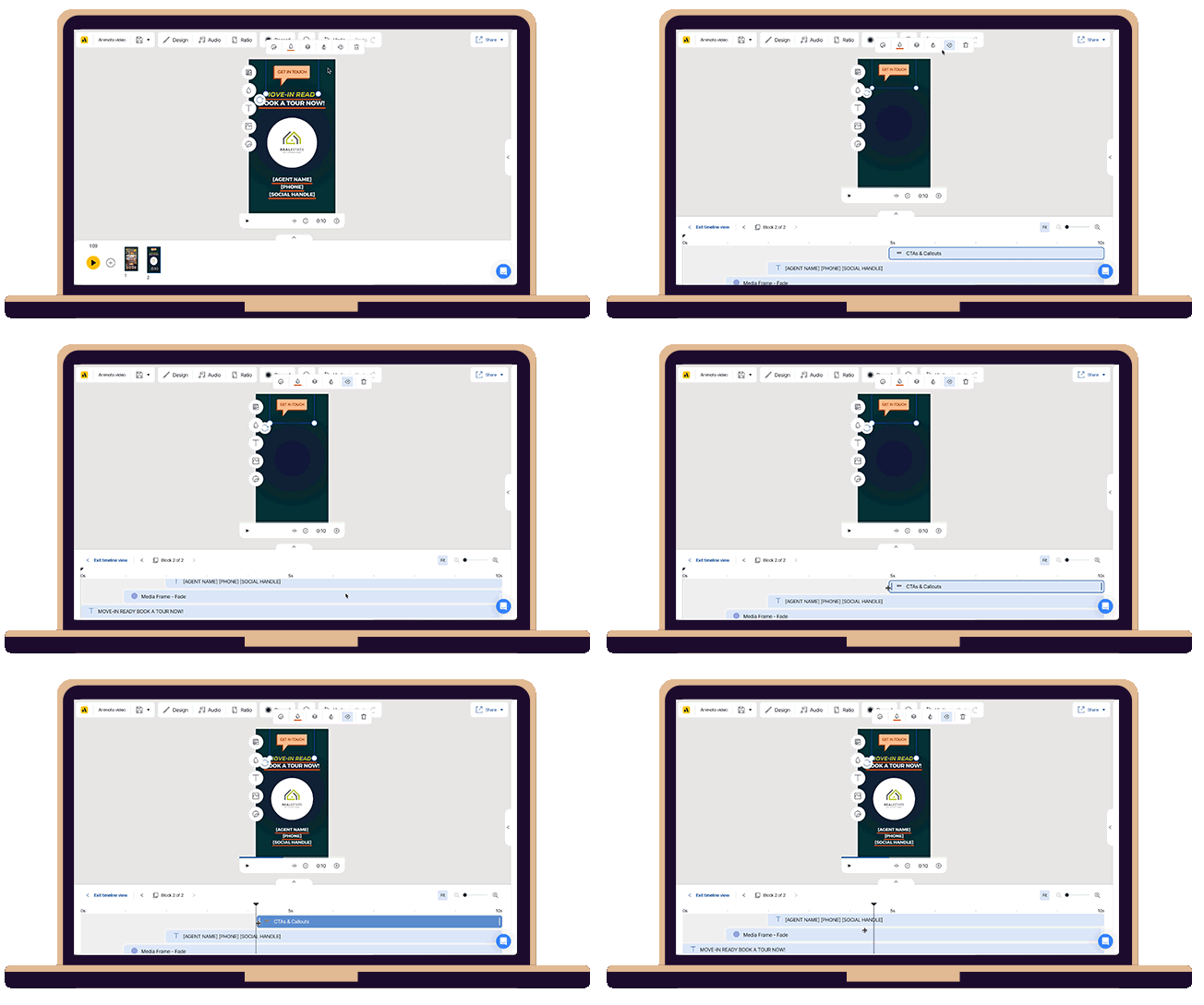
Did you know you can control exactly when text and elements appear in your video? Whether you want to line up captions with music, pop in a logo at just the right moment, or add motion to your message, it’s all possible with your video timeline.


Here's how it's done:

1. Select a text box, element, or media frame in your block.

2. Click the timer icon. This opens the timeline view at the bottom.

3. You’ll see each item shown as a layer. Drag the blue bumpers on either end to set start and end times.

4. Drag the playhead left or right to preview as you edit, and the play button to see it all come together.


GIF showing how to use timeline in Animoto
Make a video
Get more timing tips  ›

Ready for Earth Day?

Celebrate Earth Day, inspire others, and share tips with a ready-to-go video template. 

  • Earth Day Story
  • Earth Day Tips

Stay tuned for more tips and templates coming soon!

– Lucas

Template-teer and devoted cat dad


EDU Center Icon

Education
Center

Blog Icon

Blog
 

Help Center Icon

Help
Center

EDU Center Icon

Education Center

Blog Icon

Blog

Help Center Icon

Help Center

 
Animoto

Animoto Inc.
848 N. Rainbow Blvd. #3017
Las Vegas, NV 89107

Get Help | Email Preferences | Unsubscribe | Privacy Policy
Animoto

848 N. Rainbow Blvd. #3017
Las Vegas, NV 89107

Get Help | Email Preferences | Unsubscribe | Privacy Policy