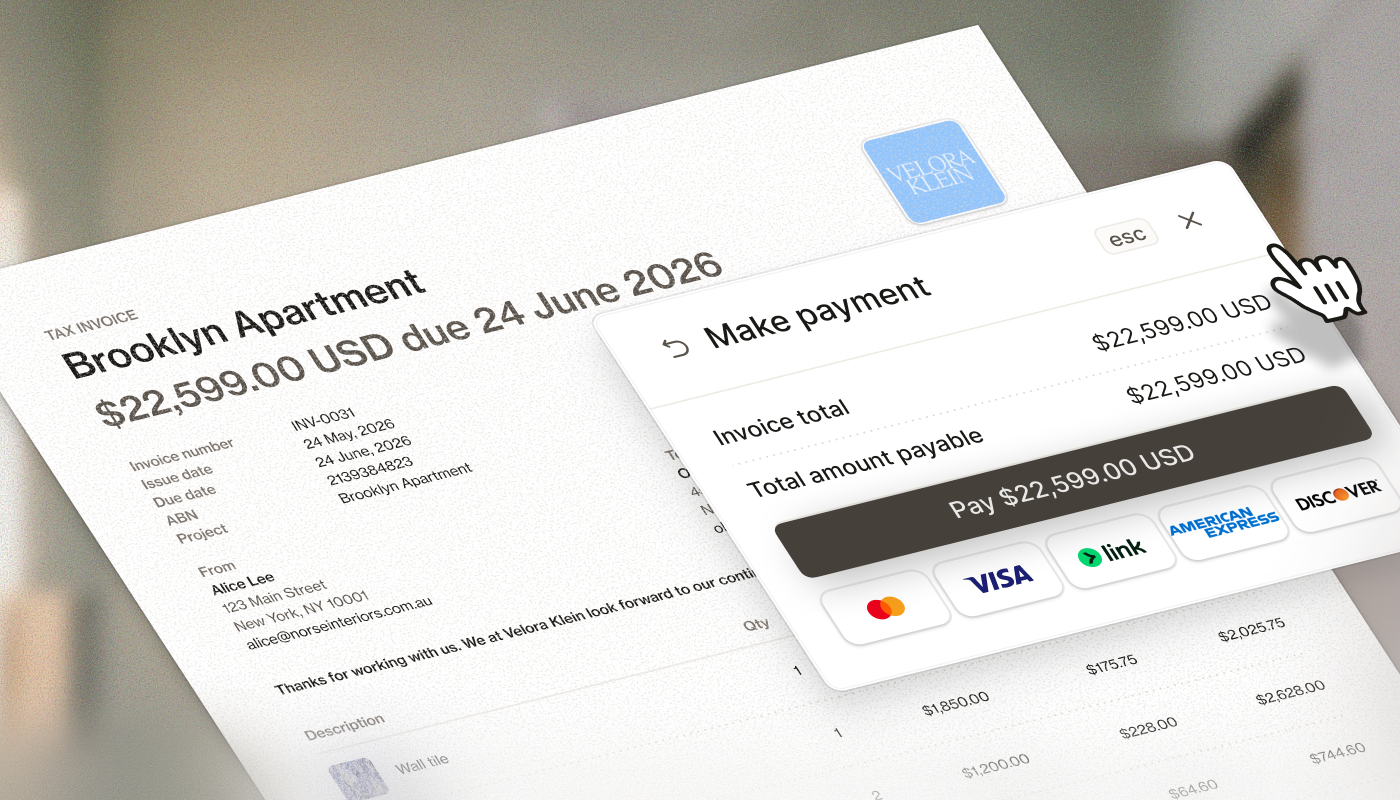
Your products, pricing, markups, and time entries already live in Programa. Use them to create your first invoice and get paid without rebuilding project data somewhere else. ͏ ͏ ͏ ͏ ͏ ͏ ͏ ͏ ͏ ͏ ͏ ͏ ͏ ͏ ͏ ͏ ͏ ͏ ͏ ͏ ͏ ͏ ͏ ͏ ͏ ͏ ͏ ͏ ͏ ͏ ͏ ͏ ͏ ͏ ͏ ͏ ͏ ͏ ͏ ͏ ͏ ͏ ͏ ͏ ͏ ͏ ͏ ͏ ͏ ͏
|
Preview text
|
|
|
|
Send invoices today. Get paid this week.
|
|
It's the end of the month. Your hours are logged. Your Schedules are full of products you've already specified, purchased, and delivered.
Programa already has the information needed to create your invoices. Pull in products, time entries, and custom line items, then send them directly to your clients.
Open Financials, create your first invoice, and see how quickly the process comes together. |
| Get started | |
|
Why invoice in Programa?
|
|
Unlike generic accounting tools, Programa builds invoices from the project data you've already captured.
|
| • |
Invoice products directly from your Schedules |
| • |
Turn logged hours into billable line items |
| • |
Accept payments online or use your preferred payment method |
| • |
Keep QuickBooks and Xero in sync |
|
|
| Want to learn more? | | Read our complete guide to creating invoices, collecting payments, managing installments, and getting paid with Programa. |
| Read the guide | |
|