| Join Thursday's live webinar: The CRM matrix: HubSpot, Salesforce and Ontraport compared.Click here to register! |
|
| | | | What if you could turn your team’s static lists — partners, members, resources, upcoming events, providers — into something interactive and self-updating?
This week’s use case shows how Ontraport’s Dynamic CMS makes it easy to build live, searchable directories that automatically update and scale effortlessly.
|
|
| | | | | Now let’s jump into the use case! Read it below in the email or click to read it online.
|
|
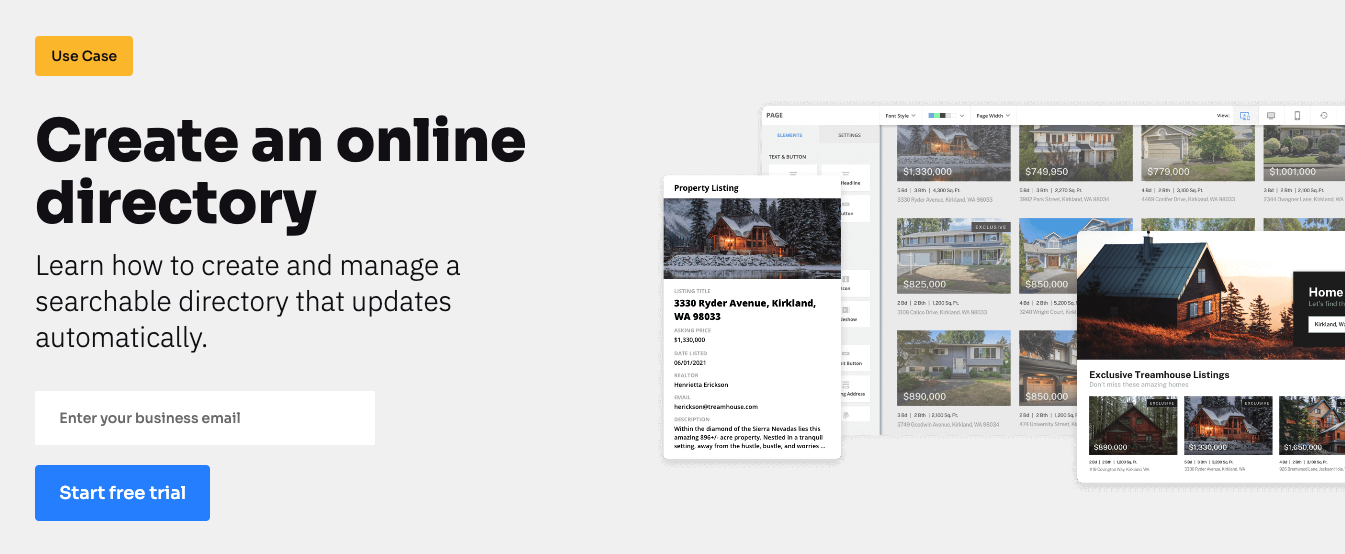
| | | | | Create an online directory |
|
| | | | | Learn how to create and manage a searchable directory that updates automatically. |
|
| | | | An all-in-one directory platform |
|
| | | Build a custom directory that stays accurate and scales — without code or integrations. |
|
| | | Always display up-to-date information |
|
| | | In many tools, your listings and data live in separate places, so it’s easy for information to drift out of sync or be inconsistent across pages.
With Ontraport, your directory site lives in the same place as your data, ensuring everything stays accurate automatically.
|
|
| | | Customize your directory for your needs
|
|
| | | Traditional directory builders limit what you can design or automate, so you need to install add-ons or write custom code to create what you envision.
In Ontraport, you can build your directory exactly how you want it. Add search filters, manage categories and trigger automated workflows — like notifying members to update their listings — all with point-and-click tools.
|
|
| | | Scale your directory without limits
|
|
| | | As your listings and traffic grow, many directory tools struggle with performance and maintenance — leaving you to manage hosting, scaling and security.
Ontraport handles that for you. Your data is backed by enterprise-grade infrastructure that supports unlimited listings, users and traffic.
|
|
| | | Build your directory the smarter way |
|
Create a live, searchable directory — no plugins, no coding, no extra tools. It’s all
possible with Ontraport. |
|
| | | Watch a directory get built in under 13 minutes in Ontraport |
|
| | | | | 6 ways to build a smarter directory with Ontraport |
|
| With Ontraport, your directory lives inside the same platform as your CRM database. That means every listing, update and search result can stay connected to real contact data — automatically. |
|
| | | Let users search and filter |
|
| Add dynamic filters and keyword search so people can quickly find the listings most relevant to them. |
|
| | | Keep your directory accurate automatically |
|
| Use workflows to prompt listing owners to refresh details, renew profiles, or approve updates on schedule. |
|
| | | Personalize what each visitor sees |
|
| Show different listings based on who’s logged in, their access level, or their relationship with your organization. |
|
| | | Trigger automation from directory activity |
|
| Launch workflows when a listing is added or updated — like sending a confirmation, notifying your team, or adding the listing owner to a campaign. |
|
| | | | Let your visitors like, upvote/downvote, favorite, mark complete, toggle on/off and interact with your content. |
|
| | | | Gate content and automatically generate passwords for portals, courses, or other content requiring a purchase or login. |
|
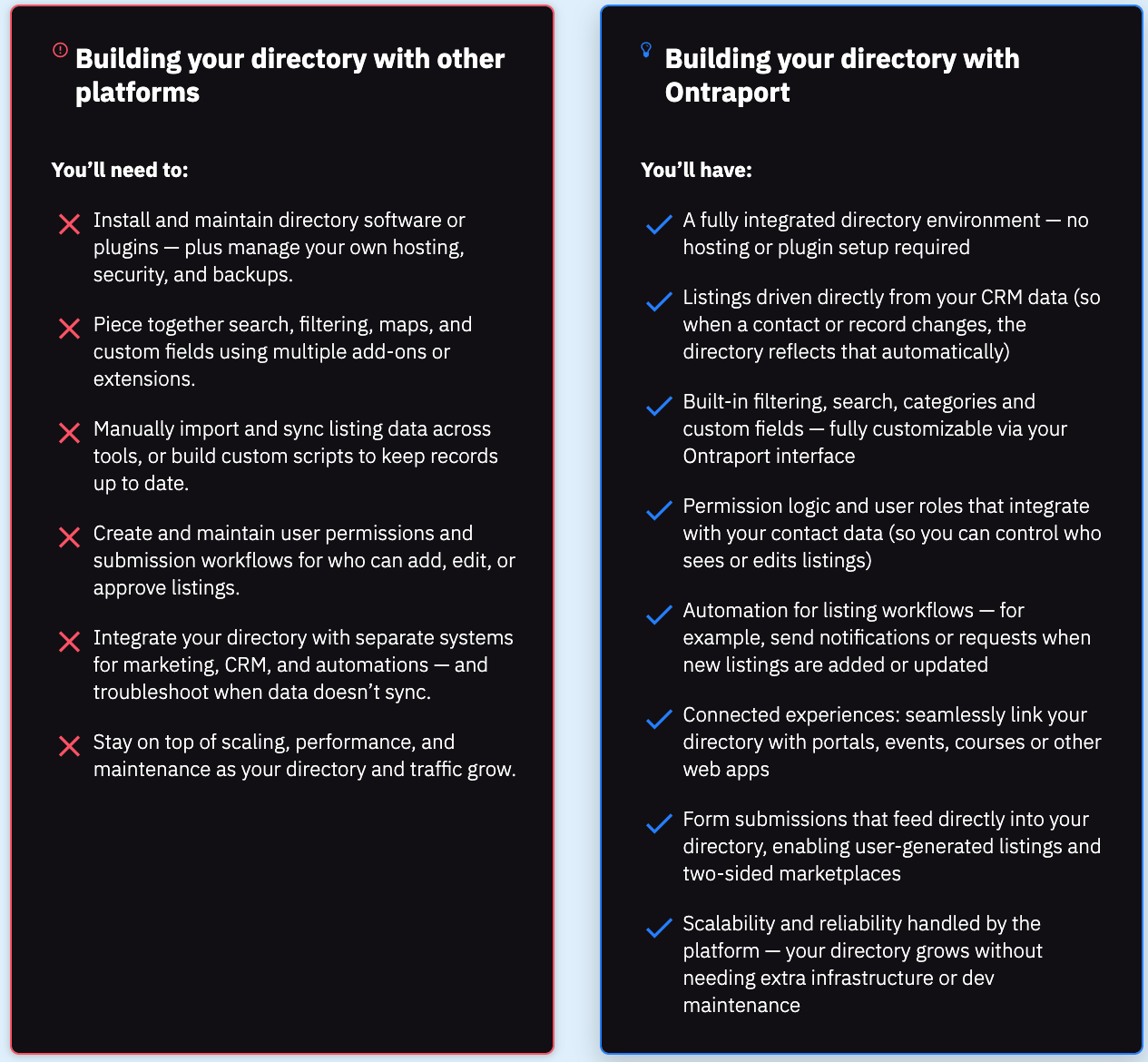
| | | | Building and running your directory with duct-taped tools vs. an integrated system |
|
| | | | | The difference in capabilities |
|
| | | | | “Ontraport's dynamic CMS has allowed us to build all sorts of interesting web experiences for our clients — technology that you'd usually pay a lot more for but it's at everyone's fingertips.” - G2 reviewer |
|
| | | | Directories give your audience an organized, searchable way to find the people, resources, or services they need. For your team, they create a single source of truth, automatically keeping information current while reducing manual updates. The result is a more engaging experience for users and a more efficient system for your team. |
|
| | | What kinds of directories can you build?
|
|
| | | You can create just about any type of directory — from member and partner lists to provider databases, resource libraries, or internal team hubs. Each directory can be customized with filters, categories, and permissions, so users can easily find what’s most relevant to them. Whether public-facing or private, every directory stays dynamic and up to date as your data evolves.
|
|
| | | How does a connected platform improve the directory experience?
|
|
| | | When your directory is connected to the same platform that manages the data in your listings, it stays accurate and up-to-date automatically.
That connection also unlocks powerful possibilities:
|
|
- Contact data: Personalize what each user sees based on their relationship, history, or status.
- Automations: Trigger alerts, updates, or approval workflows the moment listings are added or changed.
- Membership tools: Control access with permissions or password protection through portals and courses.
- Forms: Let people submit new listings or updates directly to your directory — perfect for building two-sided marketplaces or keeping records fresh without manual entry.
|
|
| | | | Hopefully this sparked some ideas for turning your list into a searchable directory that runs itself. See you next week with another deep dive!
The Ontraport team
|
|
| | | | | | | See if Ontraport is right for you |
|
Ontraport is a unified CRM platform designed for growing teams. It connects your marketing, sales and support operations in one place so you can scale. |
|
| | | | | | We’ll be back next week with more great content on how to streamline and grow with Ontraport! |
|
| | | | |