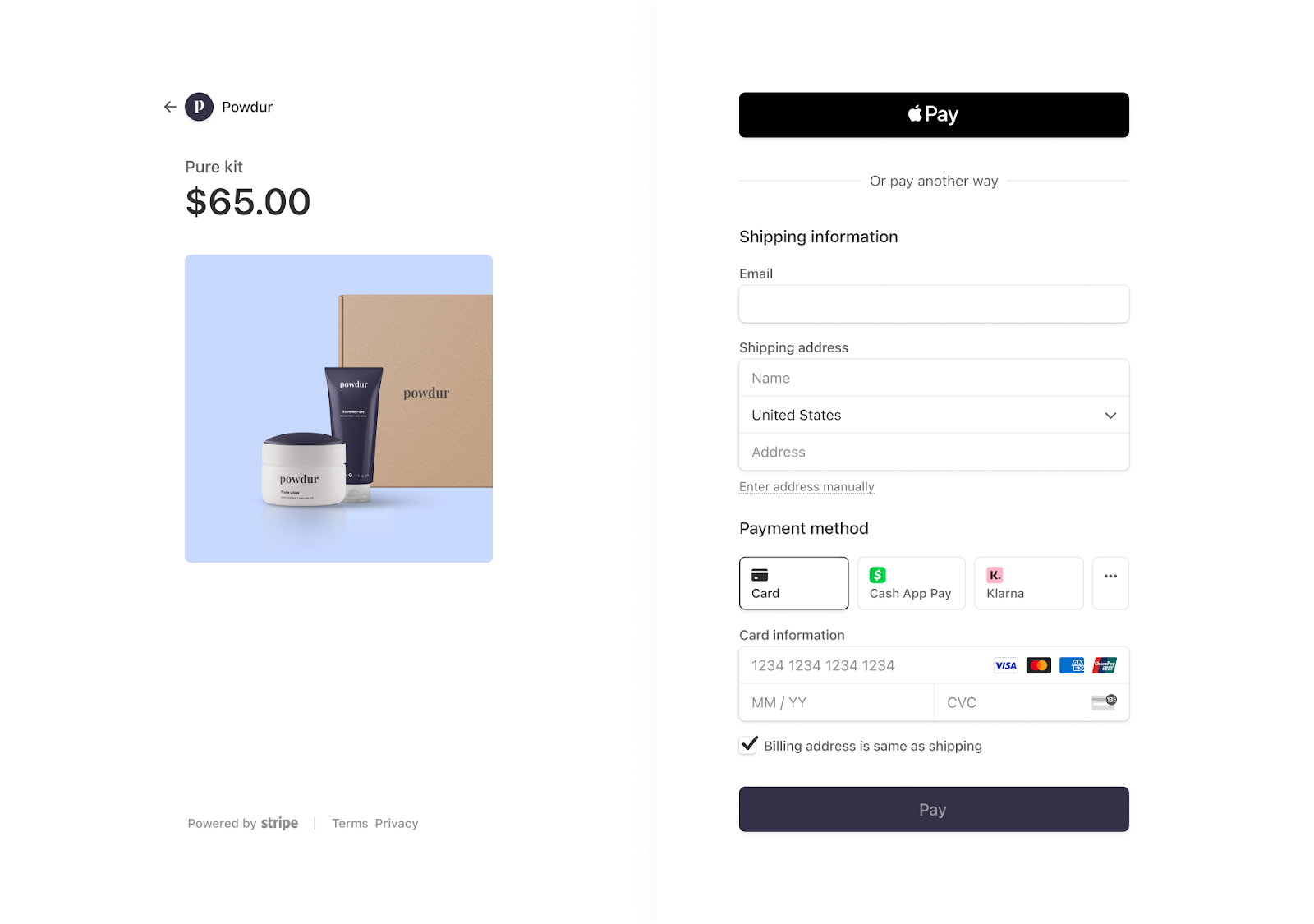
This week, we're looking at how adding flexible payment options on your checkout pages can mean the difference between a completed sale and an abandoned one.
Now let’s jump into the use case! Read it below in the email or click to read it online.
|
|
| | | Offering flexible payment options at checkout
|
|
Learn how to offer more ways to pay, including Buy Now Pay Later (BNPL) and digital wallets, right inside Ontraport
|
|
A checkout experience that works for every buyer
|
|
Add BNPL, digital wallets and more to your checkout so customers can pay the way they prefer — and you capture more sales.
|
|
Let customers split purchases into installment
|
|
When customers reach checkout with a large purchase, the full price can be the reason they don't follow through.
With the Stripe Element in Ontraport, you can offer BNPL, allowing your customers to break purchases into smaller installments. You get paid in full upfront while your customer pays over time.
|
|
| Accept digital wallets at checkout |
|
Entering payment details manually adds friction to the checkout experience. For customers on mobile or who prefer paying with saved payment info on their device, a checkout that doesn't support their preferred wallet can be enough to cause them to abandon.
With Ontraport's Stripe Element on your checkout pages, customers can pay with Apple Pay, Google Pay and other familiar wallets. |
|
| Give customers the payment methods they actually use |
|
Not every customer wants the same payment method. Some trust Affirm, others default to Apple Pay, and some prefer to pay directly with a card. A checkout that only supports one option risks losing buyers who would have converted with their preferred provider available.
Ontraport's Stripe Element integration automatically shows the best payment methods for each buyer at checkout based on location, device and currency. Customers choose what works for them, and you capture more of the sales you've already earned. |
|
| 6 ways to offer flexible payment options at checkout with Ontraport |
|
With Ontraport, you can add flexible payment options directly into your checkout pages with the Stripe Element.
|
|
| Add BNPL to any checkout page |
|
| Drag the Stripe Payment Element onto an existing Ontraport order form to give customers the option to split their purchase into installments. |
|
| Enable digital wallets in your checkout |
|
| Activate Apple Pay and other digital wallets through your Stripe Dashboard so customers can check out faster using payment methods already saved on their devices. |
|
| Let customers choose how they pay at the same checkout |
|
| Rather than sending different buyers to different pages, the Stripe Payment Element presents all available options in one place so customers self-select what works for them. |
|
| Recover failed or abandoned transactions automatically |
|
| Use automations in Ontraport to follow up when a payment fails or a checkout is abandoned — and bring buyers back with the same flexible options available. |
|
| Manage one-time and recurring payments in the same account |
|
| Offer BNPL and digital wallets on one-time purchases while continuing to run subscriptions and recurring billing inside the same Ontraport account. |
|
| Track payment activity inside each contact record |
|
| See payment method, history and outcome tied directly to the right contact in your CRM so your team has full context without switching tools. |
|
| | | | | “I love everything about the Ontraport CRM platform ... the automation features, payment processing, landing pages & forms, ease of use, and most of all, everything you get for the super affordable price you pay. You really just can't beat it! I also love the third-party integrations & continued growth that I see in Ontraport.”
|
|
| | | | | | Give your checkout the flexibility buyers expect
|
|
Offer more ways to pay so you can capture more sales.
|
|
| | | | | How does Buy Now Pay Later (BNPL) work? |
|
With BNPL, you receive the full payment upfront at the time of purchase. Using the Stripe Payment Element allows you to easily offer Buy Now, Pay Later (BNPL) options like Affirm and Klarna, which enable customers to pay over time while ensuring your business is paid in full upfront. Learn more here.
|
|
| Which payment methods can I offer through Ontraport's Stripe Element? |
|
| Ontraport's Stripe Element supports a range of modern payment options including BNPL providers like Klarna and digital wallets like Apple Pay. The options available to your customers may vary based on their location and device. |
|
Simply follow these three steps to get started:- Step 1: Drag and drop the Stripe Element onto your page
- Step 2: Configure details and styling in your element settings
- Step 3: Go to your Stripe Dashboard to activate the payment methods you want to offer
Have questions? Book a call with our team.
|
|
We hope this gives you a few ideas for making your checkout pages work harder for every buyer. See you next week with another deep dive!
The Ontraport team
|
|
| | | | | See if Ontraport is right for you
|
|
Ontraport is a unified CRM platform designed for growing teams. It connects your marketing, sales and support operations in one place so you can scale.
|
|
| | | | We’ll be back next week with more on how to streamline and grow with Ontraport! |
|
| | | | This week, we're looking at how adding flexible payment options on your checkout pages can mean the difference between a completed sale and an abandoned one.
Now let’s jump into the use case! Read it below in the email or click to read it online.
|
|
| | | Offering flexible payment options at checkout
|
|
Learn how to offer more ways to pay, including Buy Now Pay Later (BNPL) and digital wallets, right inside Ontraport
|
|
A checkout experience that works for every buyer
|
|
Add BNPL, digital wallets and more to your checkout so customers can pay the way they prefer — and you capture more sales.
|
|
Let customers split purchases into installment
|
|
When customers reach checkout with a large purchase, the full price can be the reason they don't follow through.
With the Stripe Element in Ontraport, you can offer BNPL, allowing your customers to break purchases into smaller installments. You get paid in full upfront while your customer pays over time.
|
|
| Accept digital wallets at checkout |
|
Entering payment details manually adds friction to the checkout experience. For customers on mobile or who prefer paying with saved payment info on their device, a checkout that doesn't support their preferred wallet can be enough to cause them to abandon.
With Ontraport's Stripe Element on your checkout pages, customers can pay with Apple Pay, Google Pay and other familiar wallets. |
|
| Give customers the payment methods they actually use |
|
Not every customer wants the same payment method. Some trust Affirm, others default to Apple Pay, and some prefer to pay directly with a card. A checkout that only supports one option risks losing buyers who would have converted with their preferred provider available.
Ontraport's Stripe Element integration automatically shows the best payment methods for each buyer at checkout based on location, device and currency. Customers choose what works for them, and you capture more of the sales you've already earned. |
|
| 6 ways to offer flexible payment options at checkout with Ontraport |
|
With Ontraport, you can add flexible payment options directly into your checkout pages with the Stripe Element.
|
|
| Add BNPL to any checkout page |
|
| Drag the Stripe Payment Element onto an existing Ontraport order form to give customers the option to split their purchase into installments. |
|
| Enable digital wallets in your checkout |
|
| Activate Apple Pay and other digital wallets through your Stripe Dashboard so customers can check out faster using payment methods already saved on their devices. |
|
| Let customers choose how they pay at the same checkout |
|
| Rather than sending different buyers to different pages, the Stripe Payment Element presents all available options in one place so customers self-select what works for them. |
|
| Recover failed or abandoned transactions automatically |
|
| Use automations in Ontraport to follow up when a payment fails or a checkout is abandoned — and bring buyers back with the same flexible options available. |
|
| Manage one-time and recurring payments in the same account |
|
| Offer BNPL and digital wallets on one-time purchases while continuing to run subscriptions and recurring billing inside the same Ontraport account. |
|
| Track payment activity inside each contact record |
|
| See payment method, history and outcome tied directly to the right contact in your CRM so your team has full context without switching tools. |
|
| | | | | “I love everything about the Ontraport CRM platform ... the automation features, payment processing, landing pages & forms, ease of use, and most of all, everything you get for the super affordable price you pay. You really just can't beat it! I also love the third-party integrations & continued growth that I see in Ontraport.”
|
|
| | | | | | Give your checkout the flexibility buyers expect
|
|
Offer more ways to pay so you can capture more sales.
|
|
| | | | | How does Buy Now Pay Later (BNPL) work? |
|
With BNPL, you receive the full payment upfront at the time of purchase. Using the Stripe Payment Element allows you to easily offer Buy Now, Pay Later (BNPL) options like Affirm and Klarna, which enable customers to pay over time while ensuring your business is paid in full upfront. Learn more here.
|
|
| Which payment methods can I offer through Ontraport's Stripe Element? |
|
Ontraport's Stripe Element supports a range of modern payment options including BNPL providers like Klarna and digital wallets like Apple Pay. The options available to your customers may vary based on their location and device.
|
|
Simply follow these three steps to get started:- Step 1: Drag and drop the Stripe Element onto your page
- Step 2: Configure details and styling in your element settings
- Step 3: Go to your Stripe Dashboard to activate the payment methods you want to offer
Have questions? Book a call with our team.
|
|
We hope this gives you a few ideas for making your checkout pages work harder for every buyer. See you next week with another deep dive!
The Ontraport team
|
|
| | | | | See if Ontraport is right for you
|
|
Ontraport is a unified CRM platform designed for growing teams. It connects your marketing, sales and support operations in one place so you can scale.
|
|
| | | | We’ll be back next week with more on how to streamline and grow with Ontraport! |
|
| | | | |