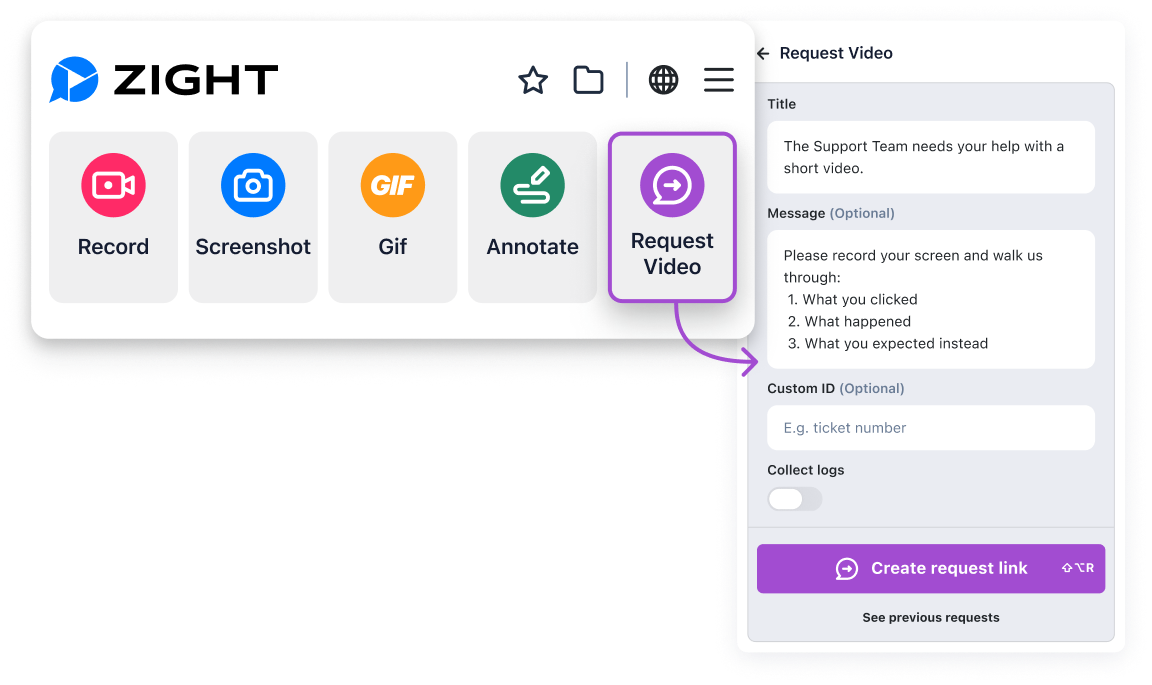
Use Request Video instead of your next troubleshooting or support call ͏ ͏ ͏ ͏ ͏ ͏ ͏ ͏ ͏ ͏ ͏ ͏ ͏ ͏ ͏ ͏ ͏ ͏ ͏ ͏ ͏ ͏ ͏ ͏ ͏ ͏ ͏ ͏ ͏ ͏ ͏ ͏ ͏ ͏ ͏ ͏ ͏ ͏ ͏ ͏ ͏ ͏ ͏ ͏ ͏ ͏ ͏ ͏ ͏ ͏ ͏ ͏ ͏ ͏ ͏ ͏ ͏ ͏ ͏ ͏ ͏ ͏ ͏ ͏ ͏ ͏ ͏ ͏ ͏ ͏ ͏ ͏ ͏ ͏ ͏ ͏ ͏ ͏ ͏ ͏ ͏ ͏ ͏ ͏ ͏ ͏ ͏ ͏ ͏ ͏ ͏ ͏ ͏ ͏ ͏ ͏ ͏ ͏ ͏ ͏ ͏ ͏ ͏ ͏ ͏ ͏ ͏ ͏ ͏ ͏ ͏ ͏ ͏ ͏ ͏ ͏ ͏ ͏ ͏ ͏ ͏ ͏ ͏ ͏ ͏ ͏ ͏ ͏ ͏ ͏
January fills up fast. Tickets, reviews, and “quick” calls that are rarely quick. Most of those meetings exist for one reason: someone needs to see what’s actually happening.
Request Video gives you a faster option. |
Before you schedule another meeting, try a Request Video. Here are three ways to ditch one this week: |
1. Skip the support call 🎧
When a support issue would normally turn into a live call, ask for a Request Video instead. The person records what they’re seeing, step by step, so you get the full walkthrough and can move forward without scheduling time.
2. Avoid the bug reproduction meeting 🐞
When a bug is hard to reproduce from a written report, Request Video captures the exact flow and state, along with Data Logs like browser, OS, and console details, so you can move straight to fixing without a screen share.
3. Replace feedback or update meetings 💬
For reviews, updates, or “can you take a look?” conversations, send a Request Video link. Then they walk through their feedback on their own time, and you still get clear, reusable context. |
Request Video is available for all users for free until January 30 on the Chrome extension, the Zight web app, and on Mac desktop. Create a link, share it, and the reply comes back to you automatically.
|
Need help getting started? Head over to our support article here. Happy Recording! The Zight Team |
|
|
Capture and Share Instantly |
Copyright © 2026 Zight. All rights reserved.
548 Market Street, San Francisco, CA 94104
Privacy Policy
|
|
|
|