On this page · 13 min read
I’ve been running Email Love on Zapier for years.
New sale, send the thank-you. New signup, start the welcome flow. Unsub over here, sync it over there. Blog post goes live, push it to social. Nothing clever, but it runs without me thinking about it.
But even with all that humming along, I was still doing a surprising amount of the business by hand.
Sunday nights writing the newsletter. Manually tracking down brand logos for the site. Calculating MRR and churn in a spreadsheet I’d inevitably break. Rebuilding the marketing calendar every couple of months. Keeping a rolling list of blog ideas in a Google Doc I kept forgetting to open.
Good automation isn’t the same as not doing the work. I had good automation. I was still doing the work.
This past week I fixed that. I added a second layer on top of the Zapier stack: a handful of AI agents running on Claude, picking up the research, gathering, drafting, and calculating that used to eat my weekends. Newsletter stories. Brand logos. Financial snapshots. Marketing calendars. Blog idea backlogs. Not all of it is hands-off. I still write the posts. I still pick the content. But the tedious work, and the work that one person could never scale on their own, is off my plate now. Agents give me an army I couldn’t have afforded any other way.
The upside isn’t that the site runs itself. The upside is I’ve got more time for the work that actually moves the business forward. Product. Customers. Strategy. The parts a founder is supposed to be doing.
One quick note before we go further. Zapier has agents now. So does Make. When I say “rule-based workflow” and “agent” below, I mean two kinds of work, not two products. You can run both inside Zapier. Mine just grew up split across Zapier and Claude.
Alright. Here’s the split.
The first layer: rule-based workflows
This is the boring, bulletproof stuff. If this happens, do that. Same input, same output, every time.
Here’s a look at the Zapier side of my stack:
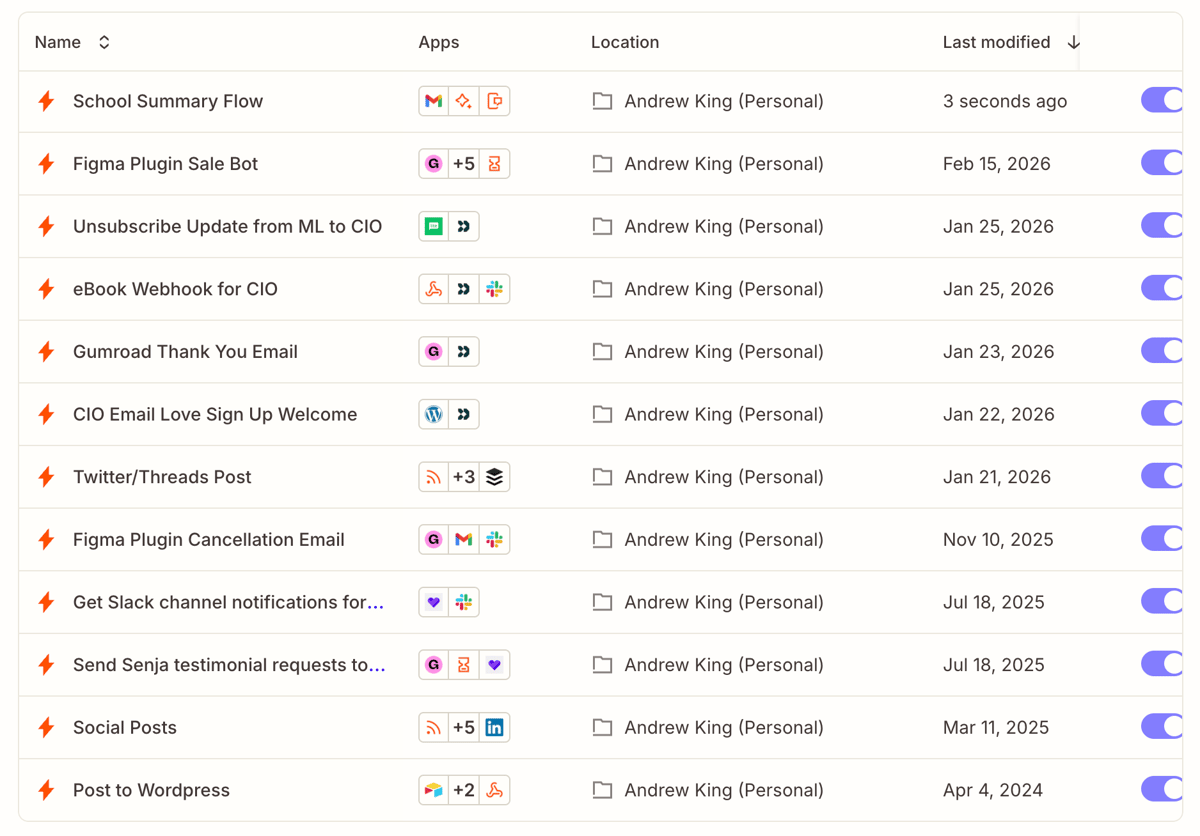
A few examples from that list:
- Figma Plugin Sale Bot. New sale fires a Slack notification so I can celebrate it (or forward it to my Co-founder, Matt).
- Thank You Email. Sale triggers the thank-you.
- Customer.io Email Love Sign Up Welcome. WordPress signup kicks off a Customer.io welcome flow.
- Figma Plugin Cancellation Email. Cancellation triggers a request for feedback email.
- Unsubscribe Update from ML to CIO. Unsubs sync across lists so we never email someone who opted out.
- eBook Webhook for CIO. Lead magnet download fires a nurture sequence.
- Social Posts and Twitter/Threads Post. New blog posts auto-share out to social.
- Post to WordPress. Inbound feeds auto-publish into the right categories.
- Send Senja testimonial requests. New customer triggers a testimonial ask.
- School Summary. As a parent, I receive a bazillion emails from my son’s school every week. I created a workflow that uses AI to summarize the key points from each email and then text it to my wife and me. Feel free to steal that idea, parents!
Every one of these is an if/then. If a sale happens, send the email. If a signup happens, start the flow. There’s no step where the workflow has to stop and think.
That’s why this layer is so reliable. You wire it once, test it, then forget about it for six months. It’s cheap. It’s fast. It’s predictable.
Most of the leverage in marketing automation still comes from boring transactional work running quietly in the background. If your stack mostly looks like the list above, you’re doing fine. I’d keep building there.
The work I just couldn’t automate
Here’s the thing. There was a bunch of work I desperately wanted to automate and couldn’t, no matter how creative I got with Zapier.
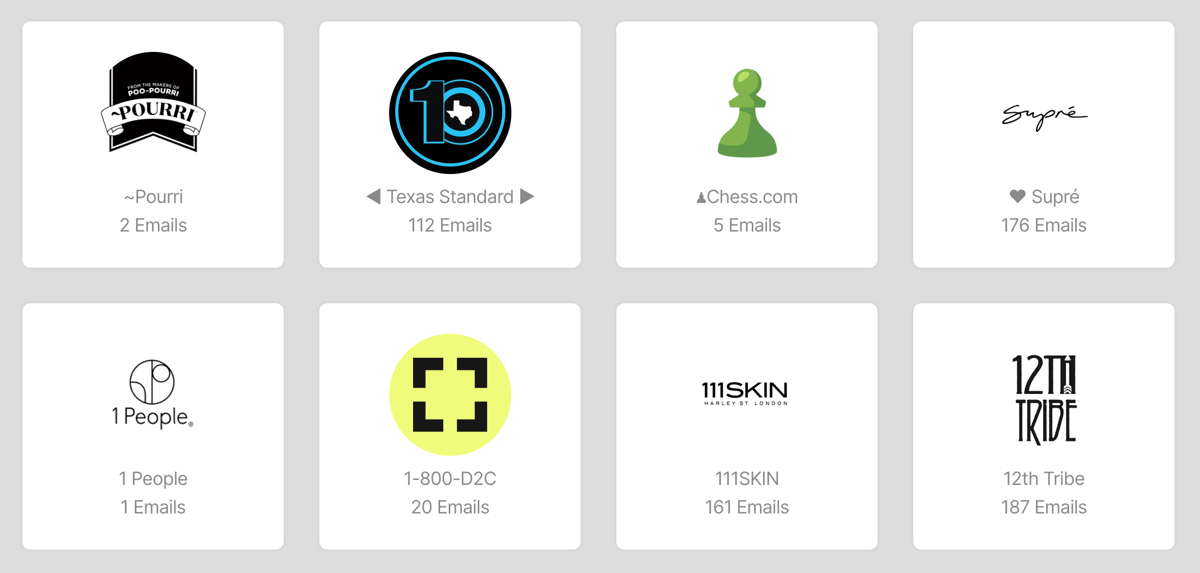
Newsletter signups is the one that haunts me. Email Love lives or dies on having a steady flow of brand emails coming into our inbox. That’s the raw material. The way we got them for years was me, personally, visiting a brand’s website, finding the signup form, entering my email, waiting for the confirmation, clicking the opt-in link, and moving to the next brand. Over the last few years I’ve done that more than 5,000 times. By hand.
There was no Zap I could build to do it for me. Browsers, forms, double opt-ins, CAPTCHAs, brand discovery in the first place. Nothing in the traditional automation toolkit could touch it.
Now I can hand Claude a list of brands for a category I want to cover, point it at my browser, and it goes and signs up for all of them. Four hours of mindless clicking turns into a prompt and a cup of coffee.
The job didn’t get easier. It got possible.
That’s the real promise of agents, at least for me. It’s not that they do workflow-shaped work better than Zapier does. They can, it’s just not cost-effective. An agent doing the same job costs a lot more to produce exactly the same output. It’s that they pick up work that was out of reach for a traditional workflow in the first place. Signing up for 5,000 newsletters. Writing weekly summaries. Pulling MRR and churn out of raw transaction data. Judging which industry stories are actually worth surfacing. Hunting down the right logo for a brand across three or four sources and making a call on whether it’s good enough to publish.
You can drop AI steps into the middle of a rule-based workflow (Zapier’s AI actions are useful for this), but what you end up with is still a pipe with a model stuck in the middle. The model does one task, then hands back to the pipe. What I wanted was the opposite. Something that owns the whole job.
The second layer: AI agents
An AI agent, the way I mean it here, is an LLM that gets a goal, picks its own tools, takes multiple steps, and produces output a human would’ve had to produce. It’s not a chatbot. It’s not one AI step in a flowchart. It’s a worker that gets a job, not a list of steps.
Here’s what’s running on the agent side for Email Love right now:
Brand Logo Updater. Daily. Picks a batch of brands missing logos on the site. Hunts across Facebook, website tags, Shopify image paths, and Google Favicons. Decides if what it found is any good (is it a placeholder, is it too low-res, is it the right brand). Uploads the best match via WordPress and logs the run to Notion. Every step is a decision.
Newsletter Stories Weekly. Every Sunday morning. Reads across ESP blogs, MediaPost, AI blogs, and the marketing trades. Picks five stories worth sending to the list. Writes the blurbs. A feed reader can pull the articles. Only an agent can decide which five matter, what order they go in, and how to describe them in a way that sounds like me.
Blog Post Ideas Weekly. Sunday morning. Researches across five angles (ESP AI features, foundation model releases, agentic workflows, deliverability, and industry research), dedups against the topics we’ve already covered, and drops three fresh ideas into a Notion backlog. When I sit down to draft something, the backlog’s already warm.
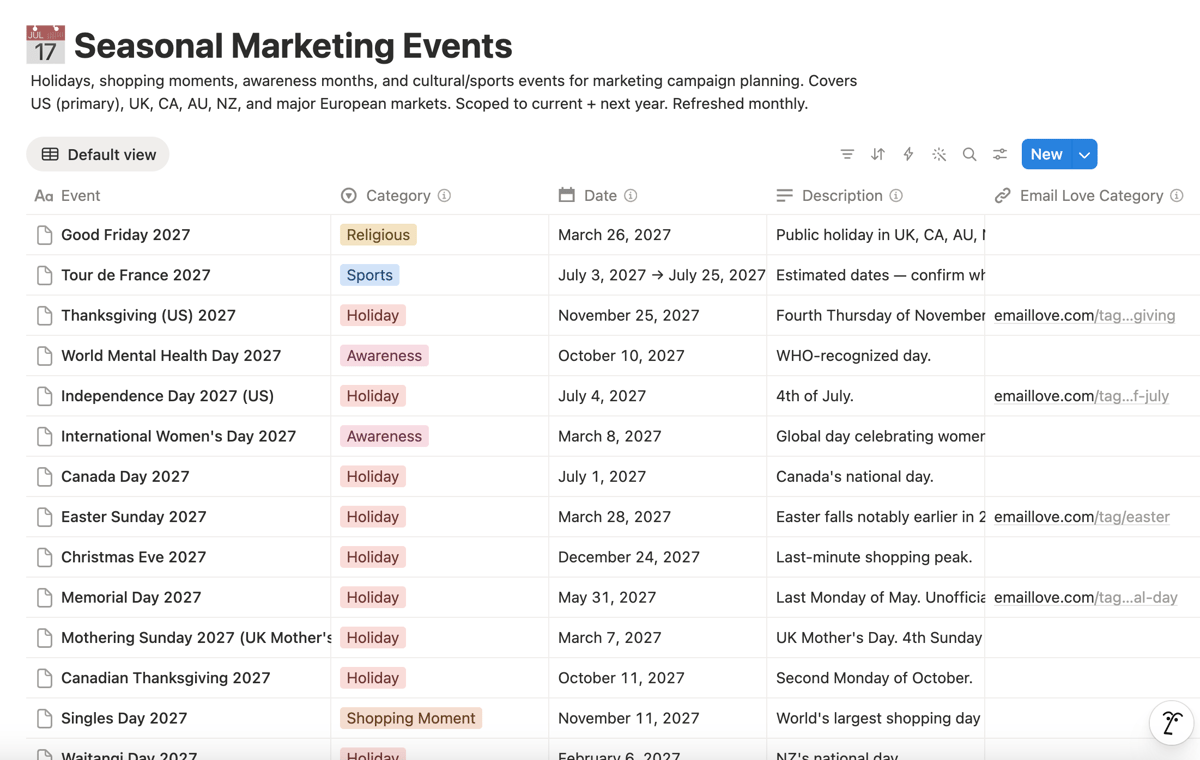
Seasonal Marketing Events DB. Refreshes monthly. Rebuilds the current and next year of holidays, shopping moments, awareness days, cultural events, and sports moments across US, UK, CA, AU, NZ, and EU. Adds a marketing angle to each and links it to the right Email Love category.
Financial Snapshots. Every Monday at 7 AM. Pulls our MRR, churn, growth rate, ARPU, AR, top client, and customer concentration, and drops structured rows into a Notion Financial Dashboard.
Slack monitoring layer. A handful of scheduled checks that post into a channel called #claude-worker-status. Upload pulse every two hours. Daily health check at 8:04 AM PT. Pipeline monitor at 9:00 AM PT. Weekly trending pills report Mondays at 8:08 AM PT. If I don’t hear from them, something’s broken. If I do, I can ignore it and trust the work.
Every one of these involves a read, a decision, and a write. Every one of them used to be me with a blank page on a Sunday night. None of them fit cleanly into an if/then.
How I decide which layer a job belongs to
When something new lands on my desk, I ask two questions.
One: can I write down every step as an if/then?
If yes, it’s a rule-based workflow. New sale, send the thank-you. New signup, start the flow. A Zap (or any rule-based tool) does this cheaper, faster, and more reliably than any agent you could build.
Two: does the output need to change even when the input looks the same?
If yes, it’s an agent. Weekly roundup, Monday snapshot, monthly events refresh. The inputs are the same shape every time. The outputs have to reflect what actually happened in the world that week.
Let me run those two questions against the actual jobs in my stack so the split is concrete.
Look back at the Zap list up top. Every one of those is the same shape. Trigger fires, email goes out. Sale happens, Slack pings. Unsub here, sync there. Post goes live, share it. Nothing in that list has to think. A Zap is the right tool for all of it.
Now look at the agent list from the section before. Newsletter stories, brand logos, financial snapshots, seasonal events, and the newsletter signups story from earlier. Same shape of input every run. Totally different output every run, because the world (or the inbox, or the data) keeps shifting underneath them. A workflow can’t do any of them.
If every run produces the same thing, Zap it. If every run needs to produce something different on purpose, let an agent handle it.
One mistake worth naming: reaching for an agent when a workflow would’ve done the job. Agents are slower, pricier, and they introduce variance. If the job doesn’t need judgment, don’t pay the variance tax. Use agents where variance is a feature (writing, curation, analysis), not where it’s a bug (transactional emails, data syncs, social reposts).
Three patterns that keep the agent layer trustworthy
Getting an agent to do the work is the easy half. The hard half is trusting it enough to let it run while you’re asleep.
Three patterns I’ve landed on. Steal all three.
1. Dry-run before you go live
Every new agent in my stack runs in a dry-run window before it’s allowed to touch anything real.
The Brand Logo Updater ran for three days writing its picks into a Notion log before it was ever allowed to push a logo to the live site. I looked at the log each morning. A few of the early picks were great. A few were “correct brand but terrible image quality.” One was a tiny favicon that would’ve looked awful on the page at full size. I wouldn’t have caught any of that in a code review.
Agents make judgment calls, which means you can’t predict day one. A dry-run window is the cheapest insurance you can buy. Three days writing to a log. Zero production impact. Full visibility. Only when I’m comfortable does the agent flip from “write to log” to “write to site.”
2. Stop-the-line rules
Hard rules beat soft guidelines every time.
The Newsletter Stories agent has a hard rule. If it can’t find five quality stories that clear the bar, it does not ship four and fake the fifth. It fails loudly in Slack and waits for me.
The Seasonal Events agent has a hard rule. If the marketing angle it generates is too generic, the row doesn’t save.
Agents given wiggle room drift. They start optimizing for shipping something over shipping the right thing. Agents given hard constraints stop when something’s off, which is exactly what you want. Any worker on the line should be able to pull the cord.
3. Make the invisible work visible
Running agents you can’t see is a trust problem.
Every agent in my stack has a place it reports in. Some write a log to Notion. Some post a summary to a Slack channel – #claude-worker-status. Some ping me directly if something breaks.
Simple rule: if the agent did its job, I should see a green light somewhere. If it didn’t, I should see a red one. No silent success. No silent failure. If I open Slack in the morning and the worker status channel is quiet, that’s information. If something broke, I know within an hour.
Every agent needs a way to phone home. Without that, you’re running a black box. A black box you can’t trust is worse than no automation at all.
How to figure out what your agents should do
If you’re a lifecycle marketer or a small marketing team, you probably already have a healthy first layer running. List syncs between tools, new-sale webhooks into your ESP, testimonial request triggers, blog posts auto-pushed to social, lead magnet downloads kicking off a nurture. That’s the plumbing. Keep it.
The more interesting question is what your agent layer should look like.
The exercise that worked for me was embarrassingly simple. I sat down and made a list of the manual work I was still doing every week. Sunday night newsletter writing. Brand logo hunting. Pulling Gumroad data into a spreadsheet. Looking up upcoming marketing holidays. Reading a dozen industry blogs. Then I opened Claude Code, described each of those jobs to it in plain English, and let it ask me questions until we had something that looked like an agent.
Worth saying up front: I’m not a developer. I know enough to be dangerous. A basic understanding of web development is really helpful here. If you can read code when you see it and you’re not scared off by a terminal window, you’ve got enough to get started. I put most of the Email Love agent layer together in Claude Code, and the setup was easier than I expected once I’d walked through the first one.
Try the same exercise. Open a blank doc. Write down every manual or semi-manual task you’re still doing on a Sunday night or between meetings. Mark the ones that need judgment. That’s your agent backlog.
A few jobs most email teams have on that list somewhere:
- Weekly data pulls from your ESP through an MCP. Most of the major ESPs have one now (Klaviyo, Customer.io, and more). Hook it up to Claude Code once, and you’ve got an agent that pulls last week’s campaign data every Monday morning, writes the narrative on what changed and why, and drops the result into Notion or Slack. No more CSV exports or copy-pasting between tabs.
- Segmentation ideas from last quarter’s behavior data. Clusters you might’ve missed. Cohorts worth building a flow around.
- Competitive teardowns of a competitor’s recent emails, with structured takeaways and a couple of swipeable ideas.
- First-draft creative briefs from a goal and your brand guidelines.
One big warning before you turn any of these loose. The whole thing falls apart without checks and balances. Agents lie. Not on purpose, but they do. They’ll confidently tell you MRR went up 12% when it didn’t. They’ll write a newsletter story about a product feature that doesn’t exist. They’ll upload a logo from the wrong brand to your site. None of that is malice. It’s what happens when you trust output you haven’t set up a way to verify.
The three patterns above are your checks and balances. Put them in place before you let anything run without you watching.
Conclusion
Rule-based workflows and AI agents aren’t competing tools. They’re two shapes of work.
If the job is the same every time, Zap it. If the job needs judgment and the output should shift week to week, let an agent handle it. Keep your workflow layer cheap and boring. Build your agent layer slowly, with dry-runs, hard stop-the-line rules, and a way for every agent to phone home.
That’s the whole game. The Zapier half of my stack is the same Zaps I’ve been running for years. The agent half is Claude sitting where a blank Google Doc used to sit. The useful move wasn’t adding AI everywhere. It was drawing a line between the two, and letting each layer do what it’s good at.
If you want to see what comes out the other end, the Email Love newsletter goes out every week with stories, inspiration, and ideas you can steal. Subscribe here.
Much love,
Andy

Andy has spent two decades building email programs for brands and agencies, and now co-runs Email Love: the inspiration gallery of 577,000+ emails and the Figma plugin that lets teams design, build, and export production-ready email without leaving their design file. He writes about email design systems, production workflow, and where the industry is heading.

Customer.io delivers more impact from every message–unifying data, messaging, and AI into one platform so every customer interaction gets smarter over time. We help teams build personalized campaigns across email, SMS, push, in-app, and webhooks, using their own first-party data to reach the right people with the right message at the right moment. AI is built into the platform to remove the grunt work, letting marketers focus on strategy, not setup. Over 9,000 brands trust us to power their messaging.