
Supported by

The ultimate search engine for email
Every email marketer we know has the folder. Screenshots with names like final-inspo-USE-THIS.png, 47 open tabs, a Slack channel called #great-emails that nobody has posted in since March. You find a beautiful email, you swear you’ll remember it, and you never see it again.
We just rebuilt how email inspiration works on Email Love and turned it into a proper search engine for email design: 411,000+ real emails you can search by brand, type, keyword, or Boolean logic. Search got dramatically more precise, you can now follow brands and save searches, and everything you care about arrives in one digest email on your schedule. Here’s a tour of what’s new, how to use it, and why it will change how you plan campaigns.
Search that respects your query
Email Love tracks 411,000+ curated emails, with hundreds more landing every day. At that scale, search has one job: when you type a brand, you should get that brand.
So that’s what happens now. Search “Sephora” and you get Sephora’s emails. Not every email that mentions Sephora somewhere in the fine print, and not lookalike brands that happen to be one letter away. Typos still land where you meant them (search “sephroa” and we’ll figure it out), but real queries return real matches only.
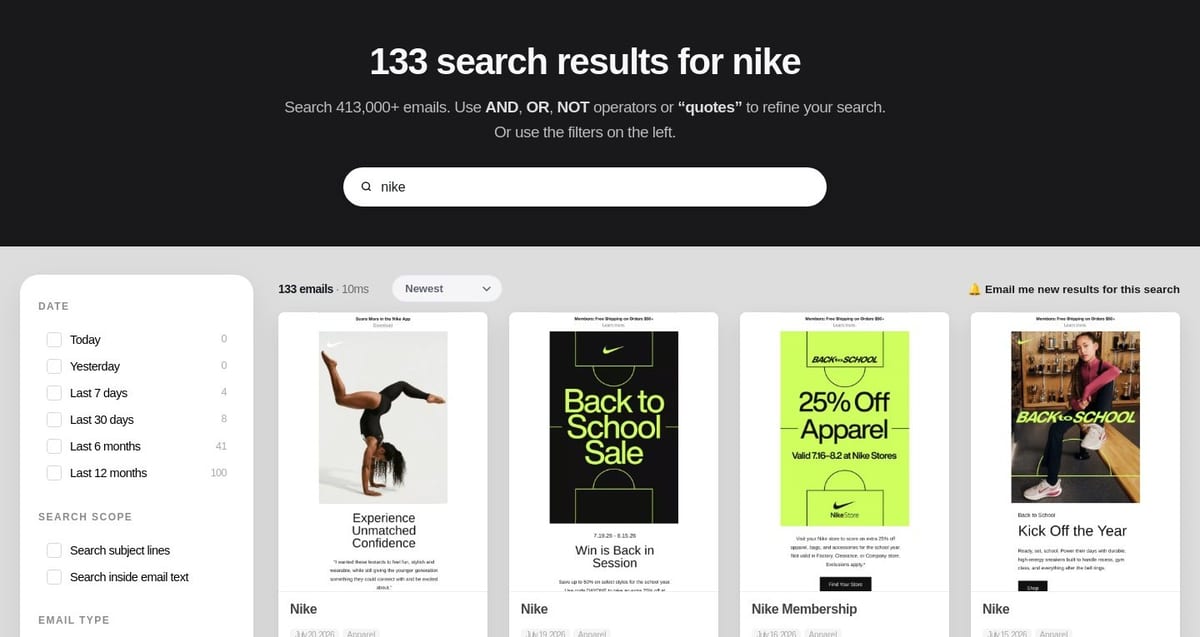
Every filter lives in the left rail, and every count updates live as you narrow down.
The filter rail is where it gets fun. You can now slice the entire library by:
- Date: today, yesterday, last 7 or 30 days, last 6 or 12 months, each with a live count
- Email type: Welcome, Abandoned Cart, Sale & Promo, Win-back, Order & Shipping, and more
- Holiday: Black Friday, Cyber Monday, Christmas, 4th of July, 14 in total
- Design: emails containing a GIF, or with an emoji in the subject line
- Sent / built with: Klaviyo, Braze, MJML, Movable Ink, and dozens more
- Category and tags: from Apparel and Beauty to Mobile-First and Big Images
Filters stack. “Klaviyo + Abandoned Cart + Contains a GIF” gives you a tight set of real examples you can teardown before your next flow review. And because the URL updates as you refine, any search is shareable. Send your designer the exact result set, not a description of it.
Need to go wider? Open up the search scope
By default, search matches who the email is from. Two checkboxes in the rail widen the net when you want it:
- Search subject lines finds every email with your phrase in the subject. Try “free shipping” or “last chance” when you’re doing copywriting research.
- Search inside email text scans the full body of every email. It’s how you find every brand that name-drops Sephora in a partnership, or every email that mentions “carbon neutral”.
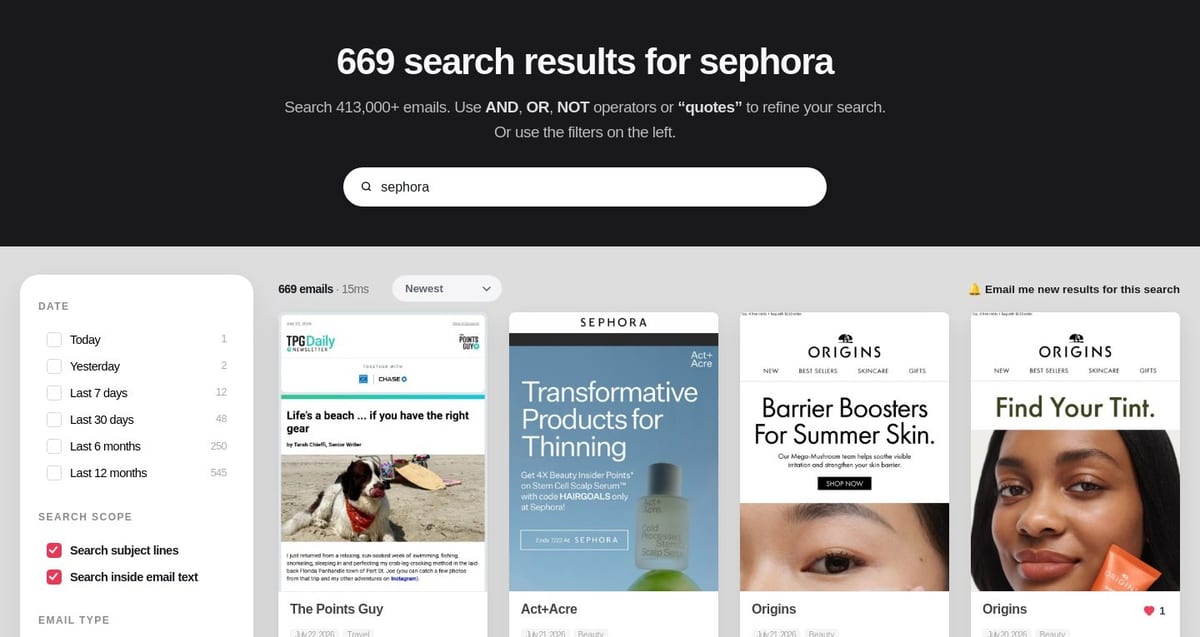
Both scope boxes ticked: the same Sephora search grows from 133 brand emails to 666 matches across subjects and body copy.
Same Sephora search: 133 results by default, and roughly five times that with both boxes ticked. Precise when you want precision, exhaustive when you want everything.
Power users: search like a pro
Type a plain query and we keep it simple: your words, matched sensibly. But when you want surgical control, the search bar speaks Boolean. Combine terms with AND, OR, and NOT, and wrap an exact match in “quotes”.

Boolean search in action: nike OR adidas pulls both brands, with the AND, OR, NOT and quotes syntax documented right under the search bar.
A few that earn their keep:
nike OR adidas: either brand, in one result set. Great for head-to-head competitor teardowns.“abandoned cart” AND urgency: the exact phrase and another term. Quotes lock words together in order.sale NOT clearance: everything about sales, minus the clearance noise.- Stack it all:
“welcome email” AND minimal NOT darknarrows to exactly the aesthetic you are researching.
A few things worth knowing. Operators must be UPPERCASE (AND, not and) so a brand name like “rag & bone” is never mistaken for a command. And because the whole search lives in the URL, even a gnarly Boolean query is a link you can send a teammate.
Precision vs. reach: when to widen the net
Boolean searches automatically look at subject lines, and that is usually the sweet spot. Subjects are the email’s headline, so results stay tightly on-topic. Search men AND Shoes and you get exactly that: “Men’s Shoes: New For Summer,” “Meet Our Newest Men’s Shoe,” “A Field Guide to Men’s Casual Shoes.”
There is one checkbox that changes the game: Search inside email text. Reach for it when the words you are combining live in the body copy, not the headline. Think industry jargon like “abandoned cart” (brands never write that in a subject line, they say “You left something behind”), a specific product name, or a phrase you know appears in the message itself. Flip it on and “abandoned cart” AND discount goes from zero results to a tidy set of real examples.
The trade-off is simple. Leave body text off for clean, on-topic results. Turn it on when you are hunting something buried in the copy and do not mind a little more noise. Same query, two different jobs.
Best part: save a Boolean search as an alert (more on alerts below) and your digest keeps running that exact logic for you, forever.
Like it, save it, keep it
Hover any email in the results and two buttons appear: a heart to like it, and a bookmark to save it to a collection. Collections are your swipe file that actually stays organized, whether that’s “Q4 promo ideas” or “onboarding flows to steal from”.
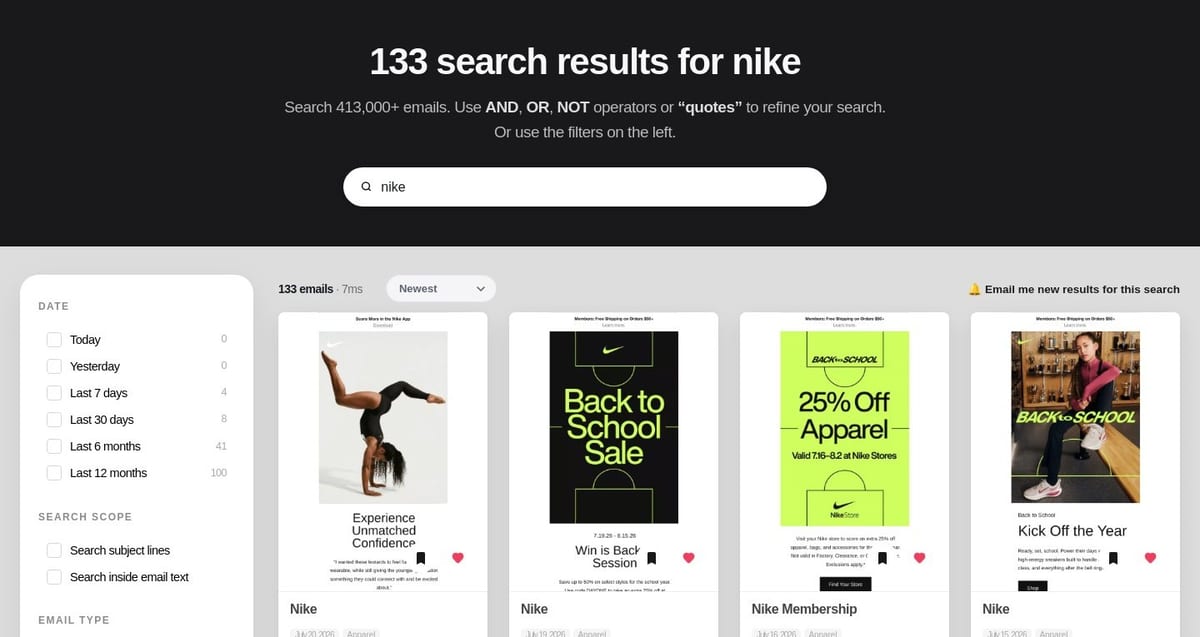
Hover any card: heart it or file it into a collection without leaving the page.
Follow the brands you love
Every one of our 8,000+ brand pages now has a Follow button, right next to Brand Insights. One click and that brand is on your watchlist. Their new sends start flowing into your digest automatically.
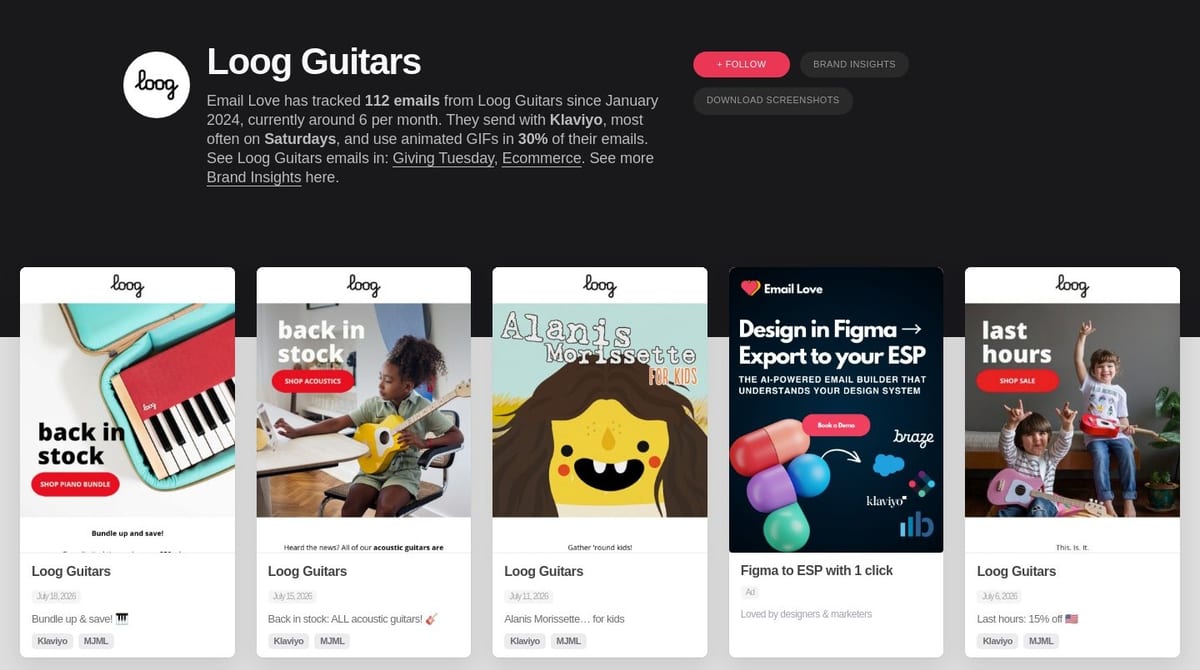
The Follow button lives on every brand page. Following feeds that brand’s new emails into your digest.
Who should you follow? The brands you compete with, the brands you admire, and two or three wildly outside your category. Some of the best lifecycle ideas come from watching a guitar company sell to parents.
Save any search as an alert
See that bell in the top right of every results page? “Email me new results for this search” saves your exact query, filters and all. New match arrives in our library, you hear about it in your digest.
You can keep up to 10 saved searches running at once. A few we’d suggest:
- Your brand name with “Search inside email text” on, to catch every mention
- Your top competitor, so their sends land next to your coffee
- “Abandoned Cart + your ESP”, a rolling collection of flow inspiration built on your exact stack
One digest, your whole watchlist
Everything above feeds a single email: your digest. Followed brands in one section, saved searches in the other, each showing up to three fresh emails as tappable thumbnail cards. Every card links straight to the full email on Email Love.
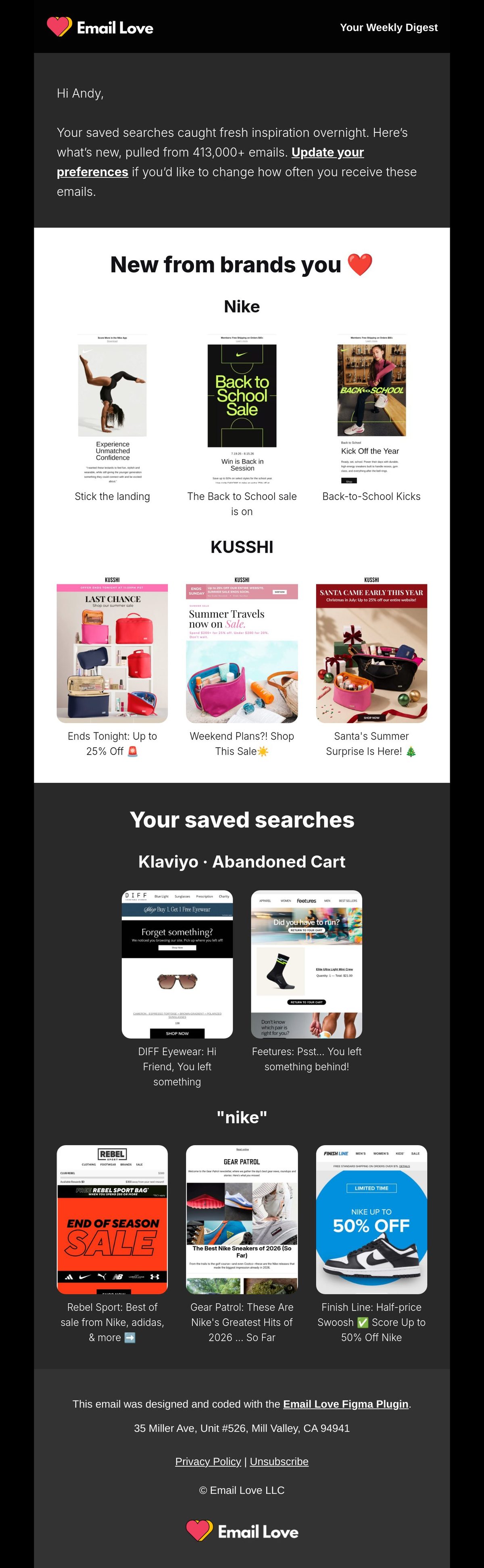
The digest: your brands in the white section, your saved searches in the dark one, every card deep-linked.
You pick the rhythm:
- Weekly (the default): Friday morning, covering the week
- Twice weekly: Tuesday and Friday, for the terminally curious
- Monthly: the first Tuesday of each month, with a month of lookback
Two details we’re proud of. First, the digest caps itself at two brands and two searches per send and rotates through your full list, so every email is different and none of them get clipped by Gmail. Second, the subject line tells you exactly what’s inside (“Your Weekly Digest: Nike, KUSSHI + 2 more”), because a digest you can triage from the inbox preview is a digest you’ll actually keep.
And yes: the digest template itself was designed in Figma and shipped with the Email Love Figma Plugin. We build our own emails with our own tools, and it shows.
Manage everything in one place
Head to Manage Alerts (it’s also in your account menu) to see your whole setup on one card: saved searches as removable chips, followed brands with one-click unfollow, and your digest schedule as four pills. Switch from weekly to monthly, pause everything, or unsubscribe entirely. No hunting, no dark patterns.
Set it up in two minutes
- Create a free account (30 seconds, no card)
- Follow three brands: a competitor, a hero, a wildcard
- Run one search you genuinely care about, stack your filters, and hit the bell
- Pick your schedule under Manage Alerts, or just let the Friday default do its thing
That’s it. Friday morning, the inspiration comes to you: fresh, curated, and already filtered to exactly what you care about. The screenshot folder can finally rest.
Want to go from inspired to shipped in the same afternoon? The Email Love Figma Plugin turns your designs into production-ready email code for your ESP, in one click.
Email search engine FAQ
How do I search for email examples on Email Love?
Use the search bar on any Email Love page and type a brand, keyword, or phrase. Narrow the results with the filters on the left (ESP, email type, holiday, GIF, date), or combine terms with AND, OR, NOT and “quotes” for precise Boolean search across 411,000+ emails.
Can I get alerted when a brand sends a new email?
Yes. Follow any of our 6,000+ brands or save any search, and every new matching email lands in your weekly digest, so you never have to go looking.
How many emails can I search?
411,000+ curated marketing emails from 6,000+ brands, with hundreds more added every day.
Is Email Love free to use?
Yes. Create a free account to save searches, follow brands, and get your personalized digest of the best new email design.
Much love,
Andy
Email: [email protected]
Twitter: @emaillove


