On this page · 7 min read
We’ve been hearing it more and more lately: email teams are experimenting with AI on their raw HTML. Pasting an email into Claude or ChatGPT and asking it to swap the copy, restyle a section, add Liquid or Handlebars for their ESP. Some are reporting real success with it, and it’s easy to see the appeal. The output comes back fast and it usually looks right in the preview.
The catch is what the preview doesn’t show you. The email can look perfect in the chat and still collapse when it renders in Outlook. The AI can “improve” a hex value and quietly hand you the wrong blue. A font swap can slip through and go unnoticed until the send is already out the door. None of it looks broken while you’re working. It shows up in the inbox, which is the one place you can’t take it back.
Here’s the thing. The problem isn’t that AI is bad at this. The problem is that “paste the email into a chatbot and hope” is not a production process. It has no source of truth, no way for your team to collaborate on the design, and no guardrails against the small silent changes that wreck an email. You get the speed of AI and the fragility of a one-off, every single time.
What you actually want is both: a single source of truth your team designs and collaborates in, and the speed of AI in production. That combination has a name. It’s an email design system. And it’s about to become the most important thing your program owns.
The trust gap is a scale problem
You might do the paste-and-edit trick once and get away with it. The trouble starts when you try to do it fifty times a quarter.
A recent industry survey put numbers on the hesitation: while roughly two thirds of email pros now use AI somewhere in their workflow, only about one percent trust it enough to start a send from it. That gap isn’t people being slow to adopt. It’s people correctly sensing that ad-hoc AI editing doesn’t hold up at volume. Every email you build by pasting HTML into a chat is a fresh roll of the dice. No two are built the same way, no two break the same way, and there’s no shared foundation catching the errors before they ship.
The instinct is to solve this by keeping a human in the loop on every AI output, reviewing each one for the blue that drifted or the layout that will fold in Outlook. But that just trades the speed you came for. If a person has to hand-check every generated email, AI didn’t scale your production. It scaled your review queue.
The real fix isn’t more review. It’s changing what the AI builds from, so most of those errors can’t happen in the first place.
A past email is a precedent. A design system is a specification.
The popular answer right now is to point AI at your old emails. Show it a campaign you’ve already approved and ask for a new one in the same style. It sounds safe. It isn’t the same thing as a design system, and the difference matters more every month.
An old email is a precedent. It tells the AI what one email looked like on one day. It doesn’t tell the AI which parts were deliberate and which were compromises. It doesn’t know your footer changed legal language in March, that the CTA color failed a contrast check and got fixed, or that the layout it’s imitating was a one-off for a product launch. Style-matching a precedent gives you brand drift with better manners.
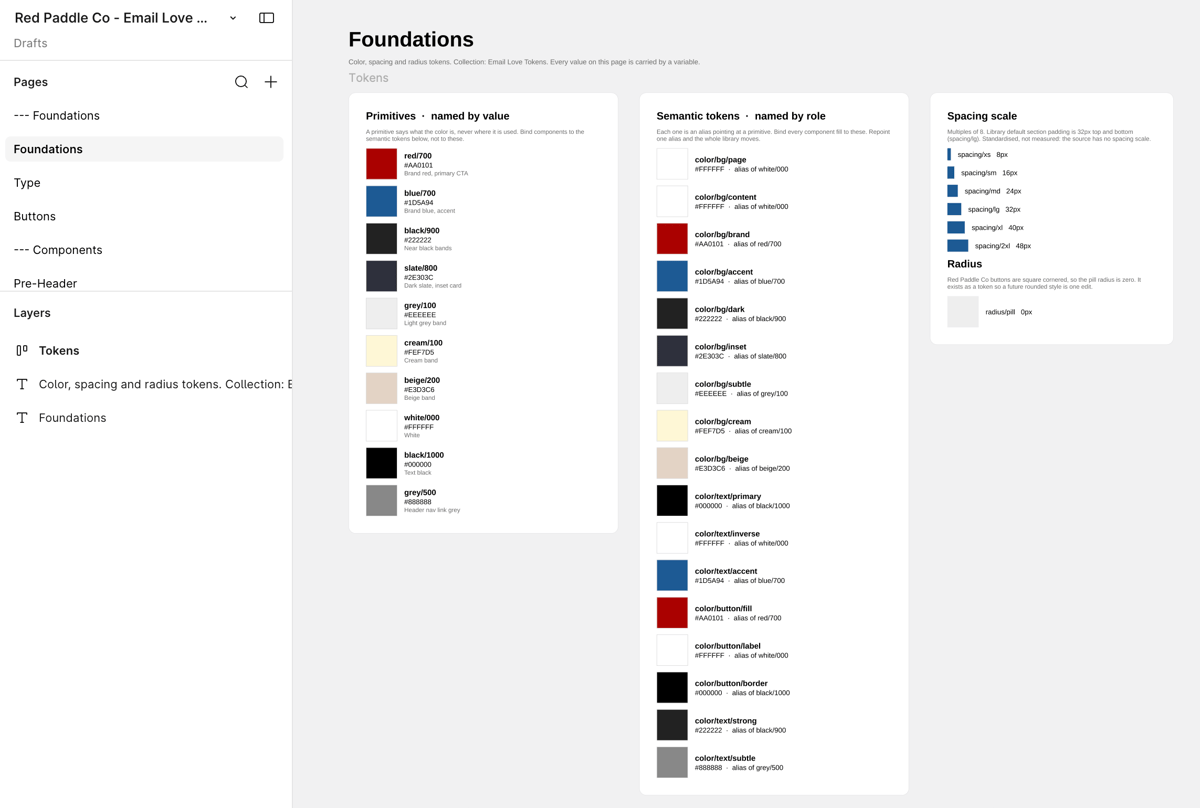
A design system is a specification. It’s the encoded set of decisions your brand already made: the approved headers and footers, the CTA patterns, the spacing, the dark mode behavior, the accessibility choices, the unsubscribe language legal signed off on. It separates approved from draft. It knows the difference between “we did this once” and “this is how we do it.”
When AI composes from precedents, a human gate has to catch everything the model guessed wrong. When AI composes from a specification, most of those checks are already answered before the draft exists. If your brand safety depends entirely on the review gate, AI didn’t reduce your review burden. It increased the throughput headed into it.
Your design system, made callable
This is where things get genuinely exciting, and it’s the workflow we’ve been building toward.
The official Figma MCP (Model Context Protocol, an open standard that lets AI assistants use outside tools directly) gives a coding agent hands on your Figma canvas. It works with both Claude and OpenAI Codex. The Email Love skill teaches the agent the rest: interview you on the brief, inventory your synced component library, and assemble a real email from it. Your header. Your hero. Your footer. Your voice.
Here’s what that looks like in practice. We ran this workflow on our own lifecycle program. In one working session, an agent built 37 emails inside our Figma file: hero sections, alternating feature rows, case-study blocks, pricing rows, image placeholders left gray for the design team to art-direct. Every email was assembled from synced components, not drawn freehand. Every one landed on the board like normal design work, where the team commented and tweaked copy right in Figma. Every one exported through the plugin as production HTML, straight to the ESP.
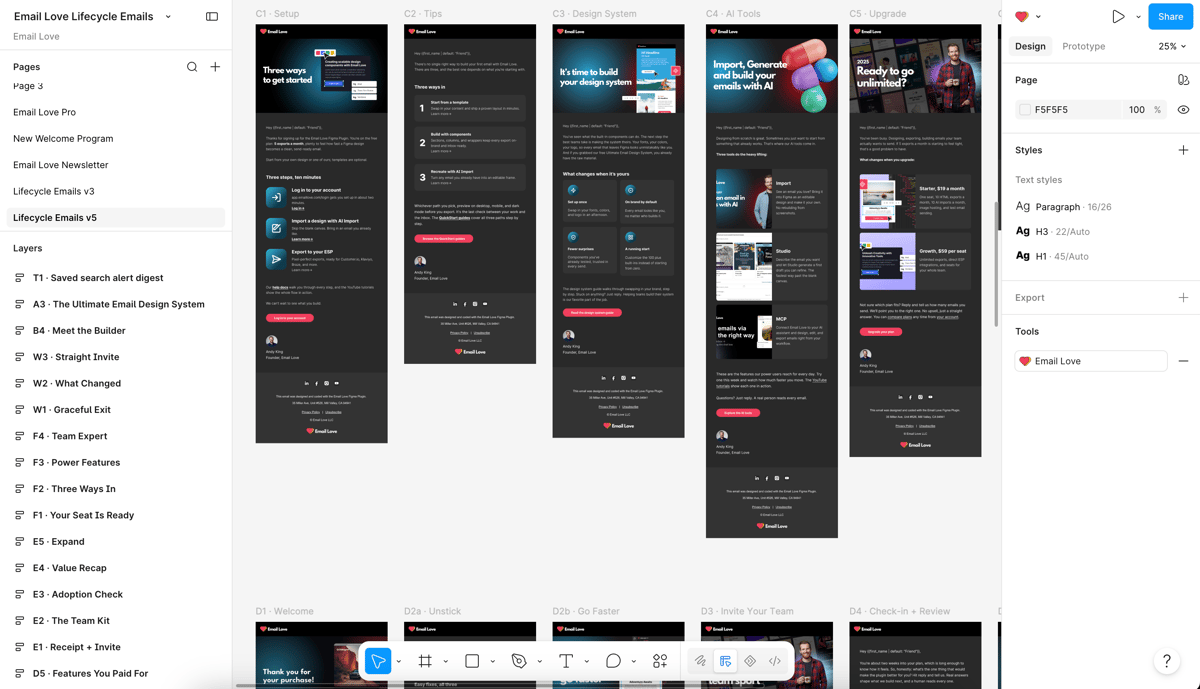
Notice what never happened in that story. Nobody reviewed those emails to make sure they were on-brand. They were on-brand the moment they existed, because every piece came from the system. The review conversation changes from “is this on brand?” (debatable, slow, exhausting) to “was this composed from approved components?” (checkable, fast, done). The agent’s rulebook makes this explicit: it instances your components or it stops and asks. “No component fits, so I’ll build it myself” is the failure the whole design exists to prevent.
That’s what we mean when we say your design system is about to become an API. It stops being a library your designers visit and becomes infrastructure that every producer of email, human or AI, builds through.
Where the system lives matters
There’s a wave of new AI email builders making a similar promise right now, and they share one quiet catch: the AI builds in their tool. Your designers work in Figma, the AI reconstructs the design in a separate builder, someone tidies the result, and then it exports. The old handoff between design and production didn’t go away. It just got a new tenant. A template builder that treats your Figma design system as the source of truth removes that tenant instead of replacing it.
Every seam in your workflow is a place where fidelity dies and time disappears. Screenshot-to-rebuild is a seam. Builder-to-ESP copy-paste is a seam. Design-file-here, production-file-there is a seam.
The alternative is to make the surface your team already lives in callable. Your design system lives in Figma because your designers live in Figma. When an agent builds through the Figma MCP, it works on the same canvas, with the same components your designers use by hand. The build lands next to your other design work. Review happens in Figma comments, the tool your team already reviews in. Export happens through the same plugin, whether a human or an agent did the assembling. One system, one file, one source of truth, two kinds of users. You don’t need a new builder to make AI safe for email. You need your existing system made callable.
What to do about it
The teams that win here are the ones whose systems are in shape before agents show up asking for components. Here’s where to start:
- Audit honestly. Is your Figma library actually componentized, or is it a pile of past emails? Precedents can’t be called. Components can.
- Name components like an engineer would. Agents read names. “Hero-3” with a clear content slot beats “Final_v2_USE THIS ONE” every time.
- Encode approved versus draft. A human can ask around to find out what’s blessed. An agent can’t. If approval isn’t in the system, it doesn’t exist.
- Run one flow end to end. Pick a welcome series. Compose it entirely from system components, no one-offs. Every gap you hit is a gap an agent would hit too.
The short version
AI is getting good at email code, but pasting emails into a chatbot was never going to scale. The answer isn’t a better prompt or another builder. It’s a design system strong enough to be the thing AI builds with, living where your team already works.
This workflow is live today, and it works with the coding agent you already use. Connect the official Figma MCP, add the free Email Love skill, and an agent can build export-ready emails from your design system, in your file, this afternoon:
- Using Claude or Claude Code? Get the Email Love Claude skills.
- Using OpenAI Codex? Get the Email Love Codex plugin.
- New to all of this? Start with the full setup guide.
And if you don’t have a real design system yet, that’s exactly what our Custom Design System service builds: 50 branded, governed, agent-ready components your whole team (and their AI) can compose from.
Much love,
Andy

Andy has spent two decades building email programs for brands and agencies, and now co-runs Email Love: the inspiration gallery of 573,000+ emails and the Figma plugin that lets teams design, build, and export production-ready email without leaving their design file. He writes about email design systems, production workflow, and where the industry is heading.

Customer.io delivers more impact from every message–unifying data, messaging, and AI into one platform so every customer interaction gets smarter over time. We help teams build personalized campaigns across email, SMS, push, in-app, and webhooks, using their own first-party data to reach the right people with the right message at the right moment. AI is built into the platform to remove the grunt work, letting marketers focus on strategy, not setup. Over 9,000 brands trust us to power their messaging.