On this page · 8 min read
This week, an Email Love subscriber did us a favour.
They replied to tell me they had received three lifecycle emails from us at once. Not three copies of the same email. Three different emails from the lifecycle program we have been building for our Figma Plugin and email builder, all landing in their inbox together.
Yeah, that sucks. And that’s on me. But first, thank you to the person who took the time to reply and tell me what happened.
I apologized, explained what had happened, and told them I completely understood if they wanted to unsubscribe. Then I went into the program and fixed the problem.
Their reply was also valuable QA. Our reports could show each automation firing exactly as configured, but the subscriber showed us what those separate automations felt like when they collided in one inbox. Each email looked perfectly healthy on its own. The experience was still broken.
I sometimes wonder how many brands actually read the replies to their marketing emails. They are easy to treat as noise or leave sitting in an unmonitored inbox, but sometimes that is where the gold is. A reply can reveal a broken link, a confusing offer, a hidden purchasing objection, or a collision between automations that looks perfectly healthy in a dashboard.
We’re a very small team trying to do a lot of big things, so every once in a while something slips through. That explains how it happened. It doesn’t make three emails arriving at once any less annoying. In this case, one subscriber’s reply helped us find the problem and make the program better for everyone who comes after them.
Replies tell you what the dashboard cannot
Dashboards are good at telling you what happened to an individual email. They show sends, deliveries, opens, clicks, conversions, unsubscribes, and whatever else you have wired up. Those numbers matter, but nobody experiences a lifecycle program as a collection of campaign reports. Subscribers experience all of it in one inbox.
Three separate automations can each look healthy while producing a terrible combined experience for the person who qualifies for all three. The campaign view says every message was delivered successfully. The subscriber view says Email Love just dumped three emails on me at once.
Our subscriber could have deleted the emails or unsubscribed without saying anything. The dashboard would have recorded the outcome, but not the reason. Because they replied, we got the part of the story the reporting could not give us.
A click can tell you what someone did. A reply can tell you why they did it, why they did not do it, what confused them, what broke, or what they wish existed instead. Replies are not a replacement for reporting, and one angry message should not overturn your entire lifecycle strategy. They are a diagnostic layer that helps you find the questions worth investigating.
If one person reports three emails arriving together, you can check how many others qualified for the same overlap. If several trial users say the setup was confusing, you can look at activation data with a much better idea of where to start. A complaint is often a bug report written in much clearer language than anything in your logs. A question can reveal missing information. An objection can explain a conversion gap. Occasionally, a customer will hand you the beginning of a new product.
Some brands make the reply the call to action
The best examples I found in the Email Love archive do not add “reply if you have questions” as a throwaway line beneath a wall of promotional content. They give people a specific reason to reply and make the conversation the point of the email.
Hanks Belts asks one useful question: what is the number one reason you have not tried Hanks yet?
That is a much better question than “Do you have any feedback?” It gives the subscriber something concrete to answer and gives the brand a direct view of the objections standing between interest and purchase. The email comes from Brian, reads like it was written by a person, and asks the reader to reply rather than complete a survey.
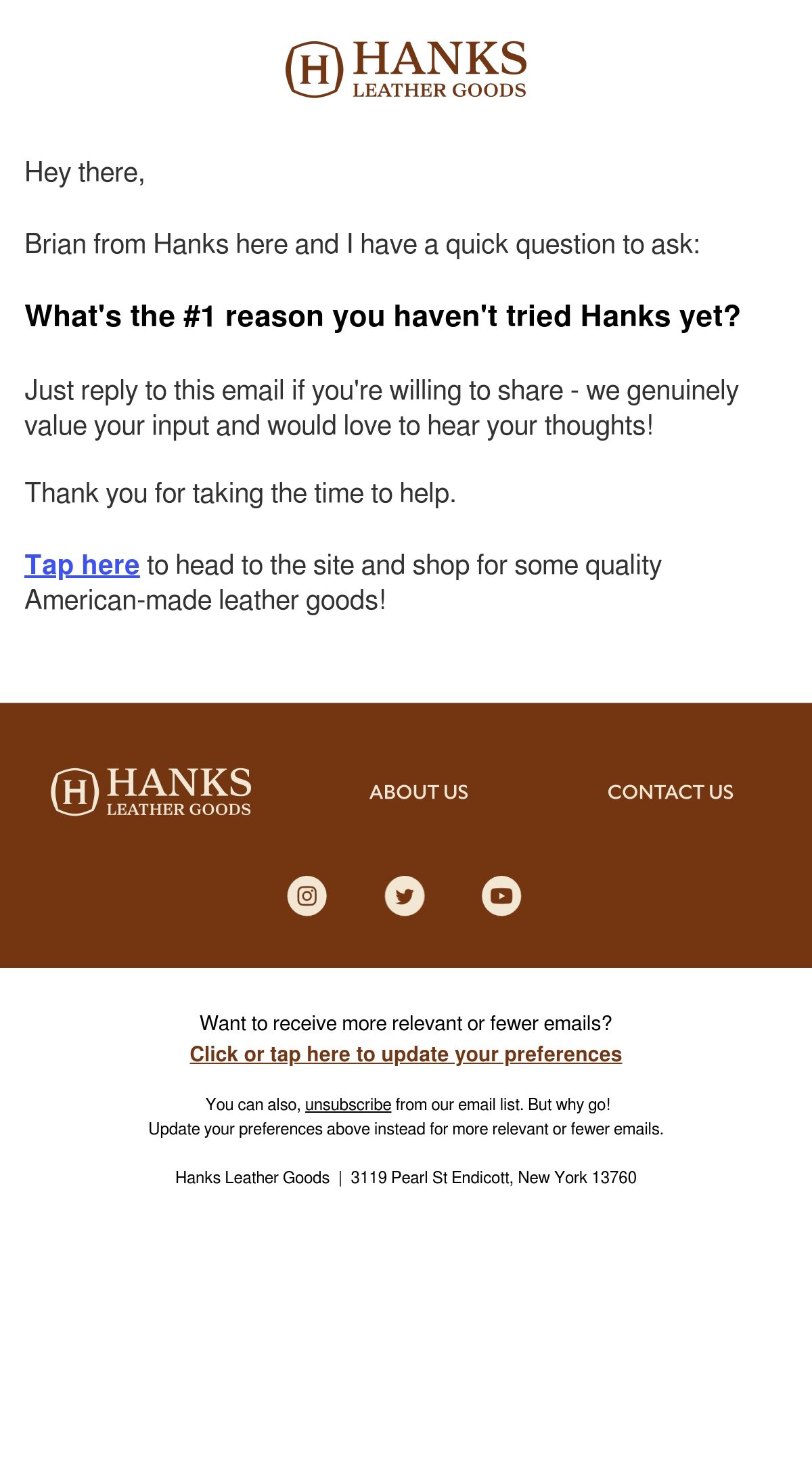
View the complete Hanks Belts email on Email Love.
Spacegoods turns the reply itself into the entry mechanic for a giveaway. It asks people to describe their “best self,” then tells them to reply to the email for a chance to win free products.
The incentive will increase the volume, but the useful part is the question. Instead of collecting another click, Spacegoods gets customers to describe the outcome they want in their own words: focused, rested, productive, clear-headed, or something the brand may not have considered. That language can inform future messaging as well as the campaign.
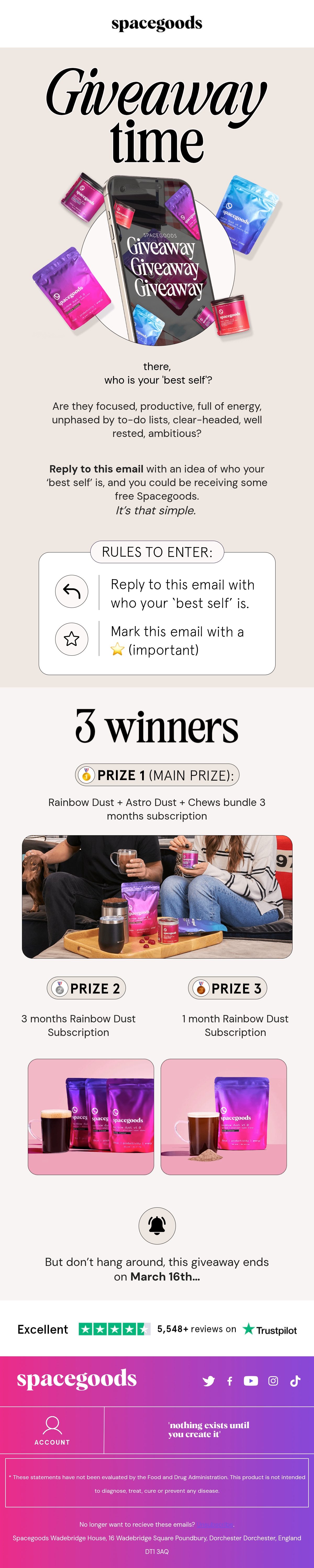
View the complete Spacegoods email on Email Love.
SimpliSafe uses replies as a support channel inside a sales email. People choosing a home security system can call a specialist or reply if they would rather discuss their floor plan by email.
That small line acknowledges that a considered purchase does not always fit neatly behind a button. Some customers need to explain their situation before they are ready to buy, and the questions they ask can show the brand which information its email, product page, or lifecycle program has failed to provide.
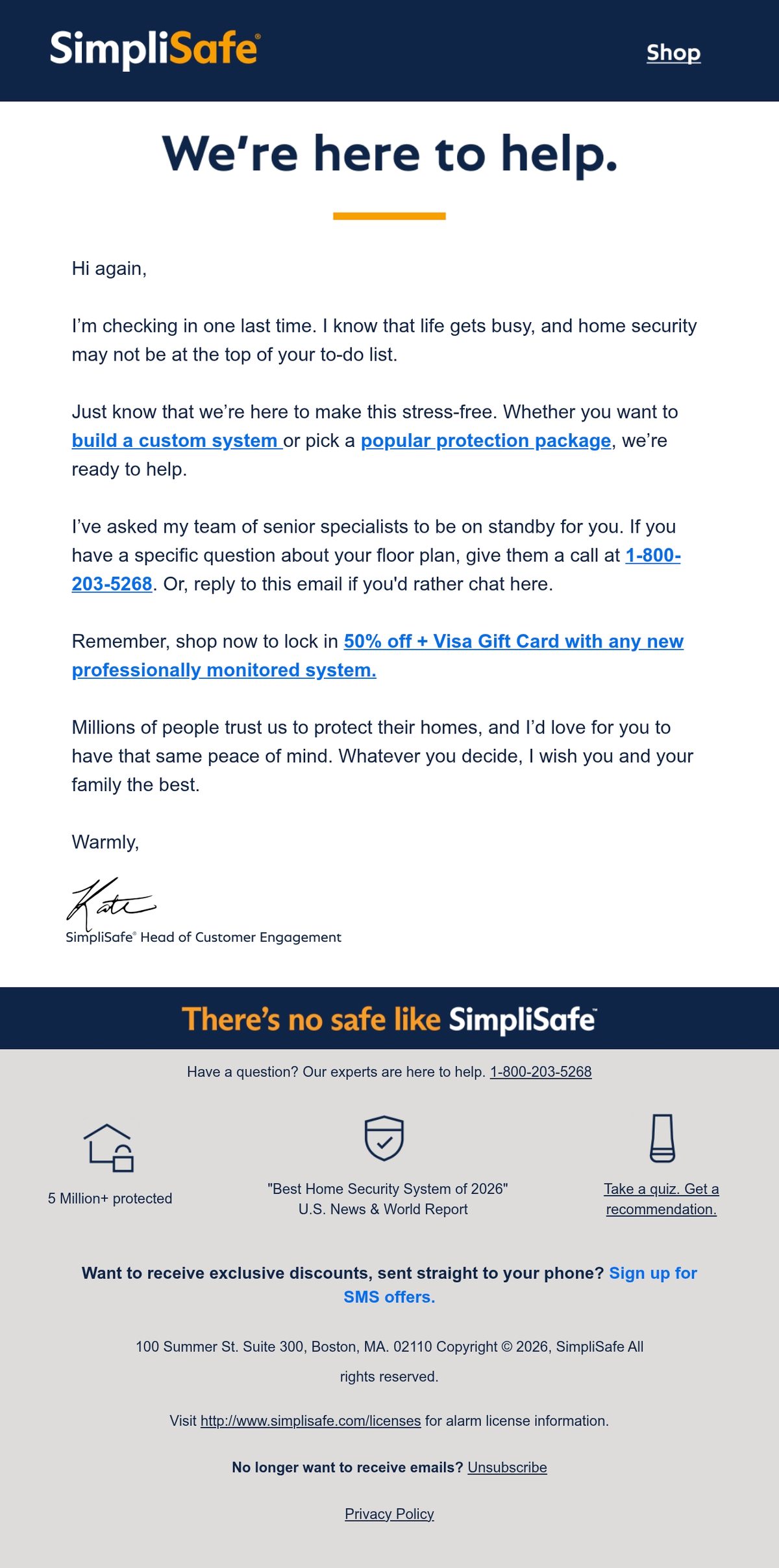
View the complete SimpliSafe email on Email Love.
Liberare shows what can happen when a brand listens beyond the immediate campaign. A customer reached out to explain that she was using one of its bras while pumping and that it had become a game changer for her. That message helped inspire the team to explore a magnetic maternity bra.
This is the clearest example of the gold hiding in customer replies. The customer was not filling in a product-development brief. She was explaining how the product fit into her life, and the brand was paying enough attention to recognize that her workaround might point to a product other people needed too.

View the complete Liberare email on Email Love.
No-reply is a product decision
The opposite of all this is the classic no-reply address. It tells subscribers that the brand is allowed to enter their inbox, but they are not allowed to answer. Sometimes the message even looks personal or claims that someone from the company has contacted you, which makes the dead end feel especially strange.
Havertys is a clear example. Its email comes from [email protected], then asks readers to add that address to their address book. The brand wants a permanent place in the customer’s inbox, but does not offer the same access in return.
It is not the only version in the archive. Arsenal Football Club tells readers twice not to reply, including a footer warning that the inbox is not monitored. Rails-to-Trails Conservancy sends from a normal-looking info address but still tells readers not to reply to the message.
Those are two versions of the same choice: advertise the dead end in the address or hide it behind a friendly sender and disclose it in the footer. Either way, questions, objections, and reports of broken experiences are directed somewhere else or lost.
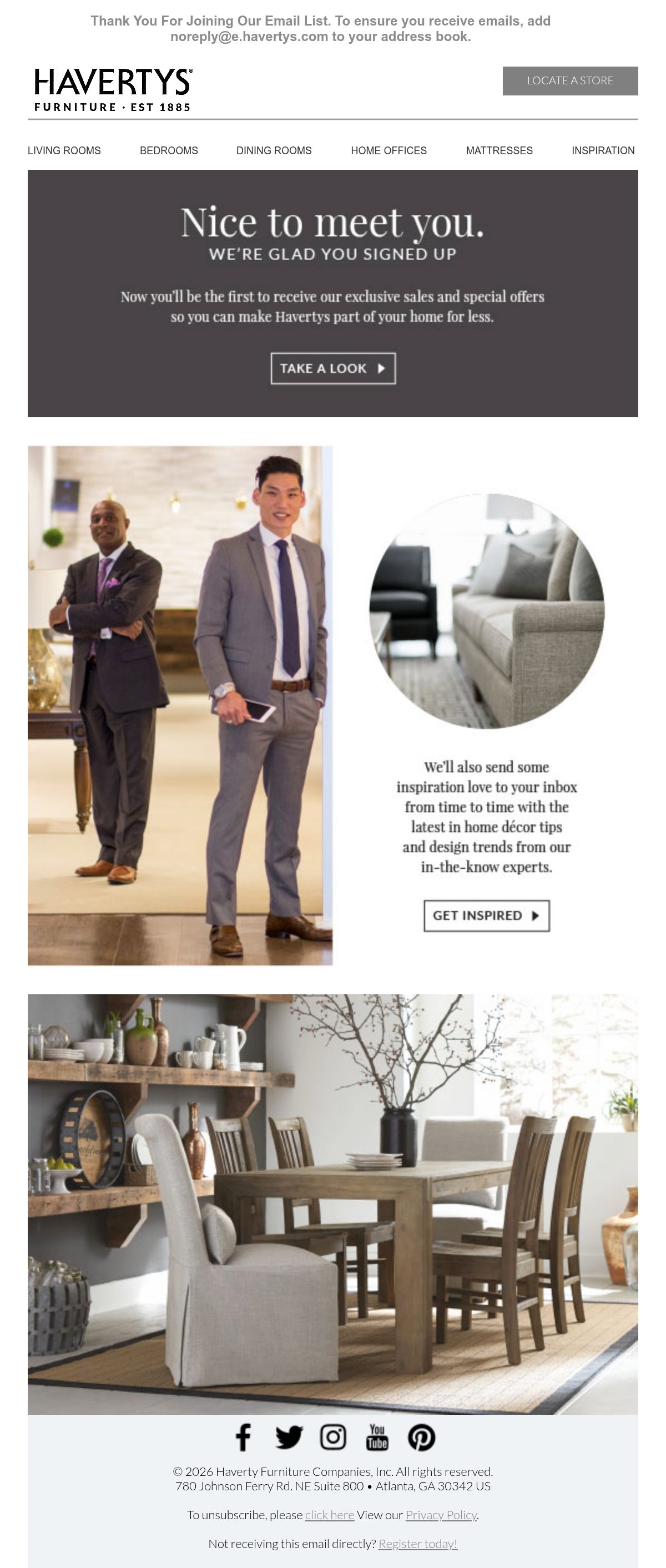
View the complete Havertys email on Email Love.
A monitored reply address creates work. Someone has to read the messages, route support questions, remove spam, and decide what deserves investigation. AI can help with that first pass by filtering obvious spam and out-of-office messages, summarizing recurring themes, and routing genuine replies to support, sales, product, or lifecycle. A person should still own the response and any decision that affects the customer, but they no longer have to manually sort every message before the useful ones reach the right team.
Replies may help deliverability too
There may be a deliverability benefit to inviting replies, although I would not make that the main reason to do it. Mailbox providers do not publish a formula that says one reply earns a certain amount of sender reputation, but a genuine response is about as clear a sign as you can get that someone recognizes the sender and wants the conversation. Gmail recommends sending to engaged users and says messages from addresses in a recipient’s contacts are less likely to be marked as spam.
The larger benefit may be indirect. A monitored inbox gives people somewhere to report a broken journey, ask a question, or explain why an email was not relevant before that frustration turns into a spam complaint. Replies are one positive signal inside a much larger reputation system, not a deliverability hack, but they can help you protect the signals mailbox providers care about most.
Turn replies into lifecycle QA
You do not need a complicated system to start learning from replies. Send marketing and lifecycle emails from an address people can answer, route those responses into a shared inbox, and make it clear who owns them. Support questions should reach support. Sales objections should reach the people working on conversion. Broken links, confusing copy, and automation collisions should make their way back to the lifecycle team.
The useful part is not simply answering each person and closing the thread. Look for patterns. Tag the reason for the reply, record the journey or campaign that produced it, and periodically compare those messages with the numbers in your reporting. A spike in unsubscribes tells you something went wrong. Five replies saying the offer was unclear tell you what to investigate.
You should also close the loop. If someone finds a broken journey, thank them and fix it. If a question keeps coming up, improve the email instead of making support answer it forever. If customer language changes how you describe a product, share that with the rest of the team.
The best question is not always “How did this campaign perform?” Sometimes it is “What are people trying to tell us that the campaign report cannot?”
Your subscribers are already doing QA
The subscriber who emailed me did us a favour. I am sure receiving three emails at once did not feel like doing us a favour from their side, but their reply exposed weak segment and trigger management in a lifecycle program we are still building.
I would obviously prefer not to send someone three emails at once. But I am glad they told me, because we found the problem, fixed it, and hopefully made the next subscriber’s experience a little better.
Your customers are already noticing the broken links, confusing offers, missing information, and strange collisions your dashboards cannot see. The question is whether you have made it possible for them to tell you, and whether anyone is listening when they do.
Much love,
Andy

Andy has spent two decades building email programs for brands and agencies, and now co-runs Email Love: the inspiration gallery of 573,000+ emails and the Figma plugin that lets teams design, build, and export production-ready email without leaving their design file. He writes about email design systems, production workflow, and where the industry is heading.

Customer.io delivers more impact from every message–unifying data, messaging, and AI into one platform so every customer interaction gets smarter over time. We help teams build personalized campaigns across email, SMS, push, in-app, and webhooks, using their own first-party data to reach the right people with the right message at the right moment. AI is built into the platform to remove the grunt work, letting marketers focus on strategy, not setup. Over 9,000 brands trust us to power their messaging.