

On this page · 7 min read
We’ve spent 15+ years in email, and the whole time we’ve believed one thing: the fastest way to send a better email is to study the best emails. That’s why Email Love exists. It’s a vast library of over 400,000 marketing emails, the lifecycle journeys behind them, and the analytics that explain why they work.
Until now, all of that lived on a website you had to open in another tab. The Email Love MCP changes that.
It brings the entire library, including marketing emails, brand lifecycle journeys, and brand-level analytics, directly into the AI tools you already use: Claude, ChatGPT, Cursor, Claude Code, and any other MCP-enabled assistant. We add over 40,000 new emails every month, so what you pull from is always current. No tab-switching. No copy-paste. Just ask, and Email Love answers inside the conversation.
What is the Email Love MCP, and why should an email marketer care?
MCP stands for Model Context Protocol, a new open standard that lets AI assistants safely connect to outside tools and data. Think of it as a universal adapter: instead of an AI being limited to what it learned in training, an MCP gives it a live, secure line into a specific source of truth.
In plain terms: the Email Love MCP turns your AI assistant into an email marketing expert that has actually seen 10,000+ real campaigns, and can pull up the exact ones you need, on demand, in the middle of whatever you’re working on.
Researching a welcome series? Ask for ten of the best from DTC apparel brands. Building a competitive deck? Compare two brands’ send cadence and tech stacks in a single sentence. Stuck on a subject line? See which words are actually showing up in the inbox this month. The library stops being a place you visit and becomes a teammate you talk to.
How it works
First things first: you need a free Email Love account to use the MCP. If you don’t have one yet, register at emaillove.com. It takes a minute and there’s no card required.
Once you’re registered, setup is a one-time, two-minute job, and the URL is always the same: https://chat.emaillove.com/mcp
You add that URL as a connector in your AI tool, sign in with your Email Love account, click Allow, and you’re done. It’s secure by design: you log in through Email Love itself, so you never paste a secret key or hand your password to the AI tool.
Here’s how to connect in Claude:
- Open Settings and go to Connectors.
- Click Add custom connector.
- Paste the URL. Leave Client ID and Secret blank.
- Click Add, then sign in and click Allow.
- On Claude Desktop only: quit and reopen the app so it picks up the new tools.
That’s it. The MCP also works with any other MCP-enabled assistant (ChatGPT, Cursor, and more).
Once you’re connected, you don’t need to memorize commands or tool names. You just talk. Your assistant figures out which Email Love capability to reach for based on what you ask. Under the hood there are seven tools doing the work:
- Search Emails: free-text search across 10,000+ curated emails, with filters by brand or category.
- Fetch Email: pull one email’s full screenshot plus our expert notes.
- Search Brands: find the brands featured on Email Love.
- List Journeys: see which brands have lifecycle journeys mapped out.
- Get Journey: walk a single brand’s lifecycle journey, stage by stage.
- Get Brand Insights: brand-level analytics including ESP, send timing, subject-line patterns, content metrics, and deliverability.
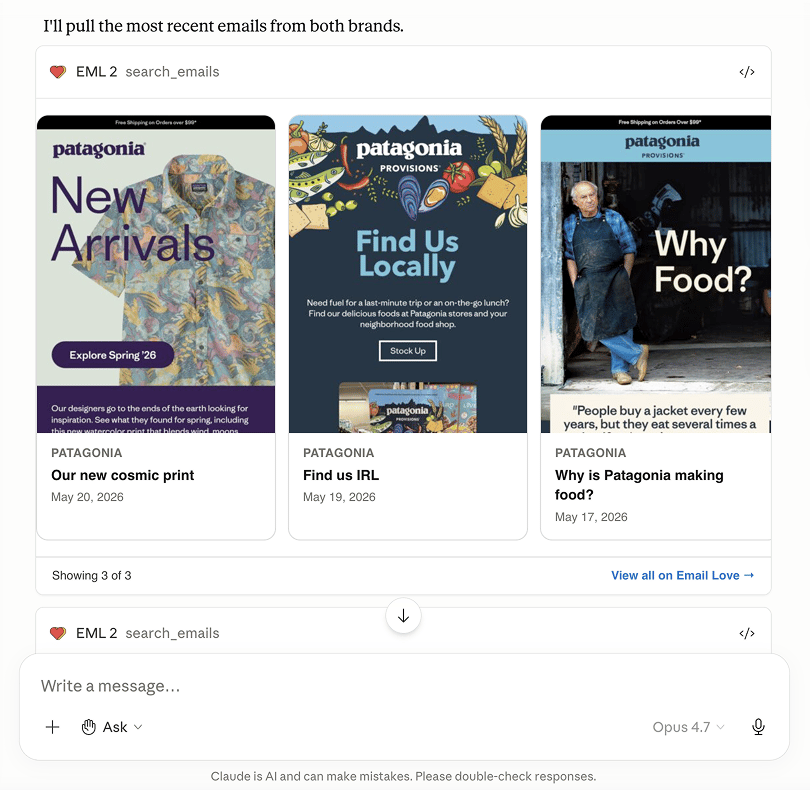
One more thing worth calling out: in Claude.ai and Claude Desktop, results render as inline cards and carousels with actual email screenshots, so you’re not reading a wall of text, you’re flipping through beautiful emails right there in the chat. CLI tools like Claude Code return the structured data instead. Still useful, just less pretty.
Five ways to put it to work today
The best way to understand the MCP is to see the kinds of questions it answers. Here are five examples we keep coming back to.
1. Competitive intelligence in one sentence
This is the one that makes people’s jaws drop. Ask your assistant:
“Use Email Love to compare REI and Patagonia’s email programs. How often do they send, what ESP do they use, and how do their subject lines differ?”
It pulls real analytics for both brands: send frequency, the ESP powering their sends, subject-line length and emoji usage, even day-of-week and time-of-day patterns. Then it lays them side by side. What used to be a multi-day research project is now a 20-second answer.
2. Lifecycle inspiration, on tap
“Show me 3 examples of post-purchase emails from DTC apparel brands. Which one has the cleanest design?”
You get real screenshots and our expert notes, ranked and explained. Perfect for the moment you’re staring at a blank canvas and need a starting point that actually converts.
3. Journey mapping without the spreadsheet
“Walk me through MeUndies’ winback flow.”
The MCP returns the brand’s lifecycle journey stage by stage: the actual emails, in order, with the strategy behind each step. It’s the fastest way we know to learn how the best brands sequence a flow before you build your own.
4. Subject-line research, brand by brand
“What words and emojis does Fabletics use most in its subject lines, and how long are they on average?”
Instead of guessing, you see the real numbers behind a brand’s subject lines: their most-used words, how often they reach for emojis, and average subject length. Study what’s working for the brands you admire, then apply it to your own.
5. Benchmark send timing across brands
“When do Lulu Lemon, Alo Yoga, and Vuori send their emails? Compare their days and times.”
Ask about several brands at once and your assistant pulls each one’s send patterns, day of week and hour of day, then lays them side by side. A fast way to benchmark your own send schedule against the brands you respect.
Email Love has two MCPs. Here’s which is which.
If you already use Email Love, you might be wondering how this fits with what you’ve got. The short version: we have two MCPs, and they do two different jobs. One helps you research; the other helps you build. This post is about the research one, but it’s worth knowing both exist so you reach for the right one.
The research MCP (the one we’re announcing today). It connects to Email Love’s library of marketing emails, brand insights, and lifecycle journeys. Use it to find inspiration, study what great brands are doing, and pull analytics. It’s free to start, and you connect it at chat.emaillove.com/mcp. This is where you figure out what to build and why.
The generation MCP (for building emails). It connects to the design system you’ve synced from the Email Love Figma Plugin and builds on-brand emails from your own components, right inside Claude or ChatGPT. It renders live previews and checks deliverability before you send. It’s available on the Growth plan or higher. This is where you design and ship. Here’s how it works.
Put simply: the research MCP helps you decide what email to send; the generation MCP helps you build and ship it. Research a winback flow and study how MeUndies structures theirs with one, then generate your own from your design system with the other. Two MCPs, one workflow, same goal: help you send beautiful, high-converting emails faster.
What about privacy?
We give a shit about this, so we’ll be direct. When you connect, Email Love receives only what it needs to do the job: your Email Love user ID and email (so we know whose account is asking) and your connecting IP for a couple of minutes (for rate-limiting, then discarded).
What we do not receive: your conversation content, your prompts, or anything beyond the specific tool call your assistant makes. We are not a party to your conversation with the AI tool. That stays between you and the tool’s vendor. Your access token lasts 30 days; revoke the connector in your AI tool any time, or change your Email Love password to invalidate all sessions. The full privacy policy and terms spell out the rest.
This is the start of something bigger
We’ve always thought of Email Love as more than a gallery. It’s a body of knowledge about what makes email work, built over years, brand by brand, campaign by campaign. The MCP is how that knowledge stops being something you look up and becomes something you can simply ask.
The line between “doing research” and “doing the work” is disappearing. Soon, the natural place to ask “what’s the best welcome email for a SaaS free trial?” won’t be a search bar. It’ll be the same assistant you’re already drafting copy and planning campaigns with. We’re building Email Love to be ready for that world, and the MCP is our first big step into it.
It’s live today, and we’d love for you to try it.
Get started
Add https://chat.emaillove.com/mcp to your favorite AI tool, sign in (or register free), and ask it to “show me 5 welcome emails for SaaS brands.” That’s it.
If you don’t have an Email Love account yet, sign up free, so you get the deepest access to our collections, journeys, expert breakdowns, and quarterly insight reports at no cost. When you’re ready to design and ship the emails you’ve been researching, the Email Love Figma Plugin takes you from idea to production-ready code.
Questions, feedback, or a use case that needs higher rate limits? We read every message at [email protected].
Now go talk to Email Love. We think you’re going to love what it has to say.
Much love,
Andy

Andy has spent two decades building email programs for brands and agencies, and now co-runs Email Love: the inspiration gallery of 609,000+ emails and the Figma plugin that lets teams design, build, and export production-ready email without leaving their design file. He writes about email design systems, production workflow, and where the industry is heading.

Customer.io delivers more impact from every message–unifying data, messaging, and AI into one platform so every customer interaction gets smarter over time. We help teams build personalized campaigns across email, SMS, push, in-app, and webhooks, using their own first-party data to reach the right people with the right message at the right moment. AI is built into the platform to remove the grunt work, letting marketers focus on strategy, not setup. Over 9,000 brands trust us to power their messaging.
 Oct 27, 2026 · 3 min read
You can now share collections and comment on emails with your team
Read article →
Oct 27, 2026 · 3 min read
You can now share collections and comment on emails with your team
Read article →
 Oct 20, 2026 · 9 min read
Salesforce Is Buying Braze. It Got Me Thinking About ESP Migrations.
Read article →
Oct 20, 2026 · 9 min read
Salesforce Is Buying Braze. It Got Me Thinking About ESP Migrations.
Read article →
 Oct 14, 2026 · 11 min read
10 MCP servers for marketers, and how I use them
Read article →
Oct 14, 2026 · 11 min read
10 MCP servers for marketers, and how I use them
Read article →

