

On this page · 7 min read
Bring your existing Figma designs, import emails from Email Love, upload your HTML, or let us create an on-brand email design system from your website.
Today, we’re making Email Love Builder free to try, so anyone can start creating beautiful, on-brand emails without having to rebuild their existing designs or start from scratch.
Until now, we’ve primarily worked with enterprise marketing teams, helping them bring their email design systems into Email Love, migrate existing templates, and connect their email production workflows to Figma. We’ve learned a lot from those teams, and we’ve been putting that experience into making Builder much easier for anyone to get started with.
We’ve also been working on something we think is particularly important: making it possible to bring the work you’ve already done into Email Love. Most marketing teams already have Figma designs, HTML templates, campaigns they’ve sent in the past, or an established brand identity. You shouldn’t have to recreate all of that just to try a new email builder.
Now you can bring those existing assets into Email Love, create a reusable design system, and start building emails.
The free plan includes one user, one design system with up to 20 of your own components and 5 templates, one design system import with AI, and 100 AI credits. You can send test emails on the free plan, but exporting an email or pushing it to your ESP needs a paid plan. You can see what’s included in each one on our plans page.
If you already have an emaillove.com account, you already have a Builder account, so just log in and you’ll be able to access it. If you don’t have one, sign up at emaillove.com to try it out for free.
Try Email Love Builder for Free
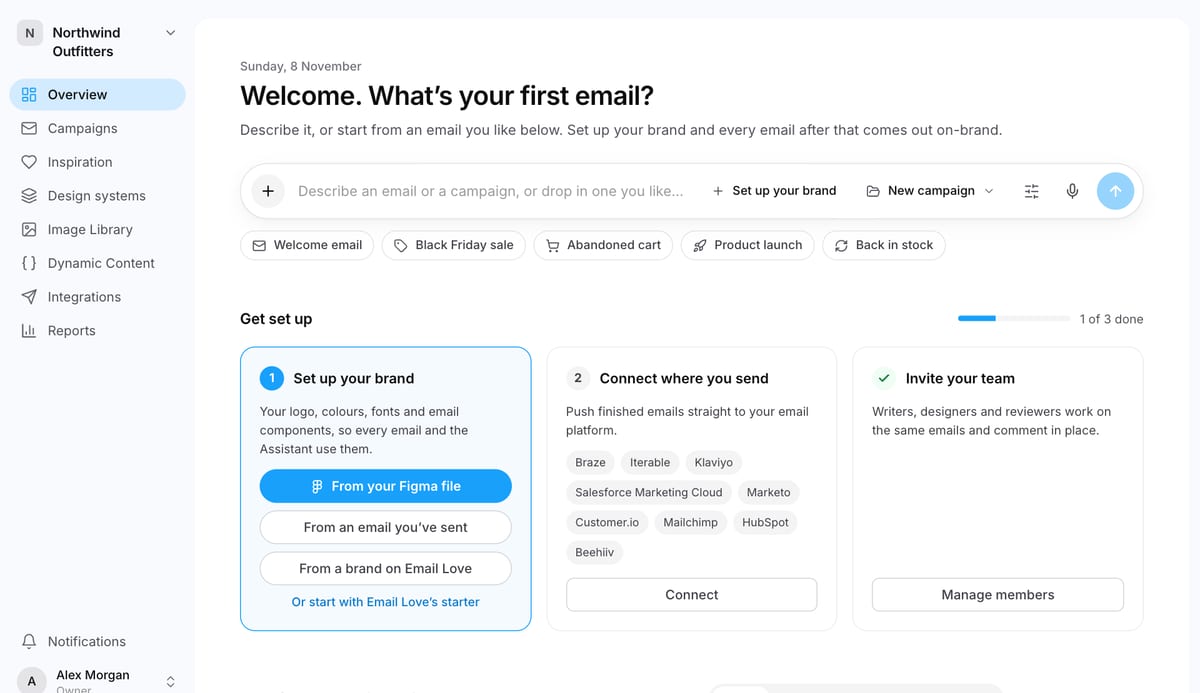
Four ways to get started
One of the biggest challenges with adopting a new email builder is getting your existing templates and brand assets into it. We’ve made that process much easier, with four different ways to create your email design system.
1. Import your existing Figma designs
If your team already designs emails in Figma, you can bring those designs into Email Love Builder and turn them into reusable components for future campaigns.
Builder can import your Figma files, and it also integrates with our Figma Plugin, so your designers can continue managing the design system in the tool they already use, while your marketing team builds campaigns in Builder. The plugin is priced separately from Builder.
2. Use your brand’s emails from emaillove.com
We’ve spent years building a library of real marketing emails from thousands of brands, and that library is now part of the Builder experience.
During setup, choose A brand on Email Love and search for your brand in the emaillove.com library. Builder picks up to five recent emails of different kinds, and you can swap any of them while it’s still reading. The build starts as soon as you click your brand, and on the free plan it uses your one design system import with AI. It’s a convenient way to get started if your team has a library of existing campaigns but doesn’t have a well-organized design system.
3. Upload your HTML email templates
If you have existing HTML emails from your ESP, another email builder, or an agency, you can upload or paste up to five of them at a time and use them as the starting point for your new design system. Each file needs to be under 512 KB. Merge tags are kept as written. Template logic, such as conditions and loops, is removed, but the content of every branch is kept.
Rather than manually recreating every header, button, content section, and footer, Email Love can help turn your existing email designs into reusable components that your team can continue building with.
4. Enter your website URL
Don’t have an email design system yet? That’s fine too.
Give Email Love your website URL and we’ll use your existing brand identity to create an on-brand email design system, including your colors, typography, buttons, layouts, and reusable components.
You can review and refine the result before using it for your campaigns, giving you a much quicker starting point than assembling everything manually.

Why marketing and design teams are turning to Email Love
There are plenty of drag-and-drop email builders available, but we think the way most of them fit into the design and production process could be much better.
We’ve built Email Love around how marketing and design teams actually work, with a particular focus on connecting the tools they already use.
Built around Figma, where your email designs already live
For many marketing teams, email design begins in Figma. Designers create the layouts, maintain the brand components, and collaborate on the creative before handing everything over to the marketing team.
The problem is what happens next. Someone usually has to rebuild the approved design inside an ESP or a separate email builder, which creates extra work and introduces opportunities for the finished email to drift away from the original design.
Email Love takes a different approach.
Your designers can continue working in Figma, maintaining the components, variants, and layouts that make up your email design system. Those components can then be synchronized into Email Love Builder, where marketers can assemble campaigns, edit copy, replace images, and make changes without touching code or breaking the underlying design.
The goal is simple: keep your email design system connected to the emails you’re actually sending.
Your email inspiration is now part of the creative process
This is something we’re especially excited about because it brings together two parts of Email Love that have traditionally been separate.
Every day, marketers and designers visit emaillove.com to discover email inspiration, follow brands, save emails they like, and organize their favorites into collections.
Now, that inspiration is integrated directly into Email Love Builder.
You can browse the emails you’ve liked, see the latest campaigns from brands you follow, and access your saved collections while working on your next campaign. If you see something you like, you can add it to your email brief as a visual reference for the Assistant.
We want to connect the process of discovering great emails with the process of creating them.
Built for teams to create campaigns together
Email production is rarely a one-person job. Designers, marketers, copywriters, and other stakeholders all contribute to a campaign, but many tools still make that process unnecessarily complicated.
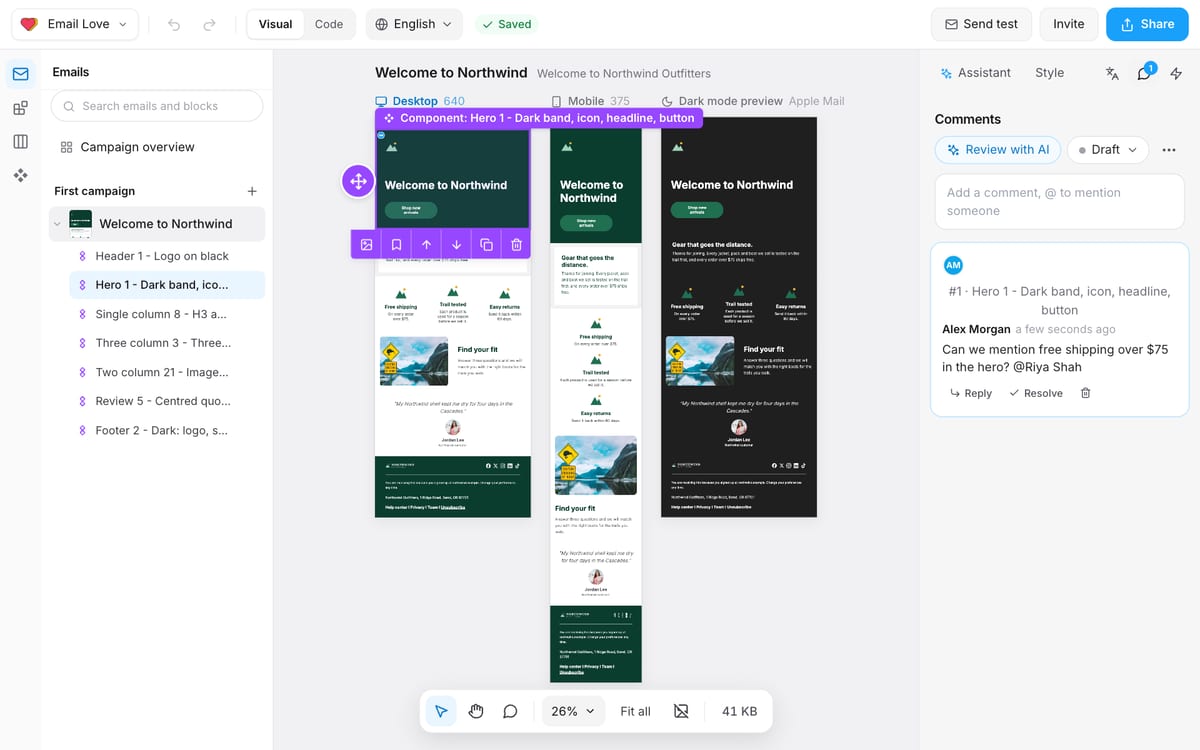
We’ve built collaboration into Email Love Builder, so multiple people can work on campaigns at the same time, co-edit emails, leave comments, and manage approvals together.
That means your copywriter can make changes while your designer works on the layout, your marketer can review the campaign, and stakeholders can provide feedback without passing different versions of an email around.
Combined with the collaboration features on emaillove.com, where teams can share inspiration collections and comment on individual emails, this gives everyone a more connected way to work from the initial campaign idea through to the finished email.
Built by email marketers, for email marketers
Matt and I have both spent more than 20 years working in email marketing and email technology, and we’ve seen firsthand how frustrating email production can be.
Email HTML is notoriously difficult to work with, and the requirements are different from designing a website or landing page. You have to think about Outlook, responsive layouts, dark mode, personalization, accessibility, and all the little differences between email clients.
We’ve tried to make those considerations a natural part of building an email, rather than something you have to deal with after the creative work is finished.
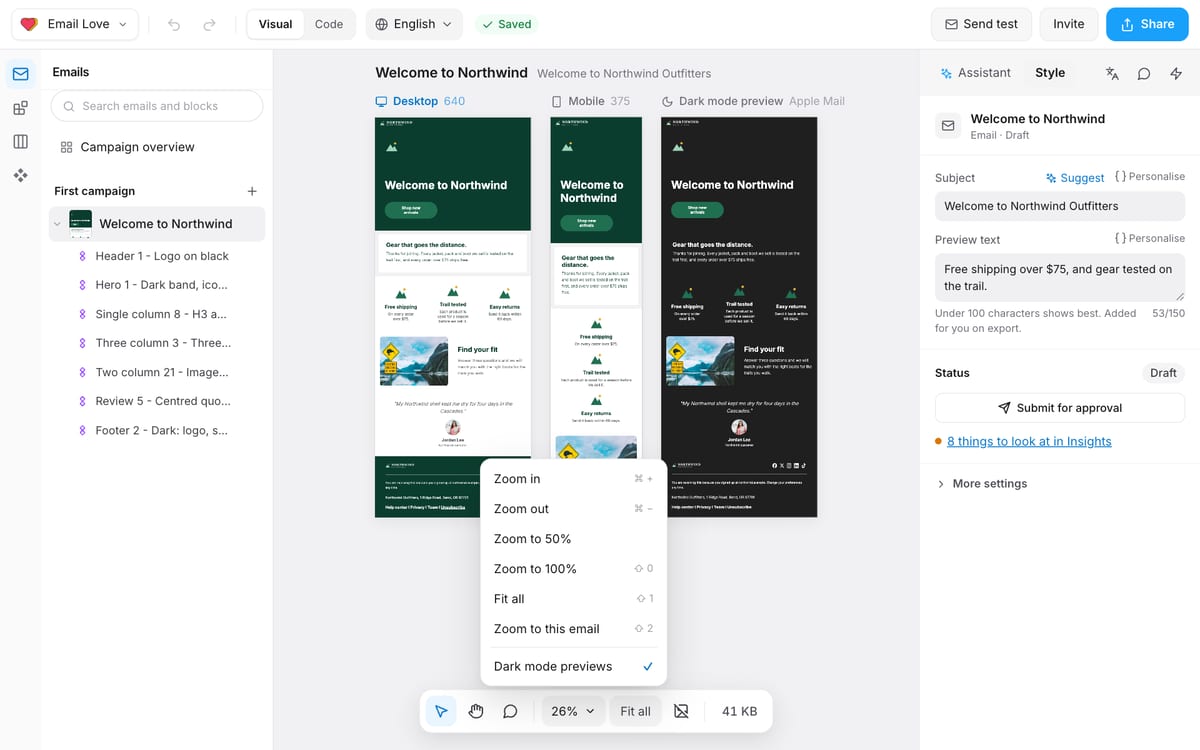
For example, you can preview how your email looks on desktop and mobile, check its appearance in dark mode while you’re working, and use reusable components that already follow your brand’s design rules.
We’ve also built support for dynamic content, translations, and integrations with leading ESPs including Braze, Iterable, Klaviyo, Salesforce Marketing Cloud, and Customer.io, so on a paid plan your finished email can move straight into the platform your team already uses.
And Builder runs on the same email rendering and export engine we’ve been building for years for our Figma Plugin.
You can also build emails with AI
We’ve added an AI Assistant directly into Builder, allowing you to describe the email you want to create and get a first draft using your design system.
For example, you can ask it to create a Black Friday promotion, a welcome email, or a product announcement, provide some information about the campaign, and let it assemble an initial version for your team to review and edit.
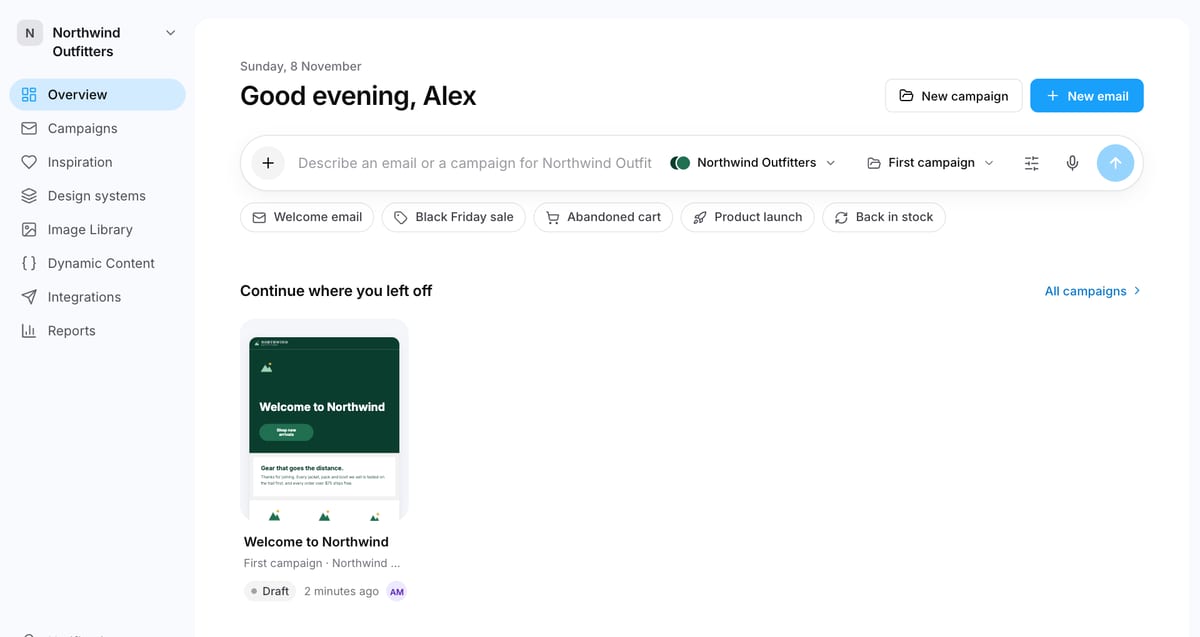
You can also include inspiration from emaillove.com in the brief, giving the Assistant a better understanding of the layout or creative direction you’re looking for.
Importantly, we’re not trying to replace your designers or give AI complete control over your brand. We want to make the repetitive parts of email production easier, while keeping your brand components, creative decisions, and approvals in the hands of your team.
Give Email Love Builder a try
We’ve spent a lot of time building Email Love for larger marketing teams, but we believe the same tools should be accessible to anyone who wants to create better emails.
Whether you have an established Figma design system, a handful of HTML emails you’ve already sent, or just a website and an idea for your next campaign, you can now try Email Love Builder for free.
Bring in something you’ve already created, build your first email, and see how it fits into your workflow.
Try Email Love Builder for Free
Want a demo first? Book a call with us.
Much love,
Andy

Andy has spent two decades building email programs for brands and agencies, and now co-runs Email Love: the inspiration gallery of 613,000+ emails and the Figma plugin that lets teams design, build, and export production-ready email without leaving their design file. He writes about email design systems, production workflow, and where the industry is heading.

Customer.io delivers more impact from every message–unifying data, messaging, and AI into one platform so every customer interaction gets smarter over time. We help teams build personalized campaigns across email, SMS, push, in-app, and webhooks, using their own first-party data to reach the right people with the right message at the right moment. AI is built into the platform to remove the grunt work, letting marketers focus on strategy, not setup. Over 9,000 brands trust us to power their messaging.
 Oct 27, 2026 · 3 min read
You can now share collections and comment on emails with your team
Read article →
 Oct 20, 2026 · 9 min read
Salesforce Is Buying Braze. It Got Me Thinking About ESP Migrations.
Read article →
 Oct 14, 2026 · 11 min read
10 MCP servers for marketers, and how I use them
Read article →

