On this page · 5 min read
Most lifecycle marketing teams spend months getting their website data into their email platform. They file tickets, wait for engineering sprints, compromise on scope, and end up with half of what they actually needed.
We did it in a week. And we don’t have an engineering team.
After years of running Email Love, building SaaS products, and working in technical roles across the email industry, I understand how this stuff works. How APIs connect, how data should flow between systems, what good architecture looks like.
I just can’t write the code myself. Until recently, that meant either paying a developer or simply not building it.
That changed when I started using Claude Code and Claude Cowork. Not as a novelty. As actual production tools that now power critical parts of our business.
Here’s what we built, what it unlocked for our email program, and the honest caveats you need to know.
The Problem: Two Systems That Don’t Talk
We recently migrated to Customer.io as our email platform. Powerful tool. But out of the box, it has zero visibility into what our users actually do on emaillove.com. It doesn’t know which emails they’ve liked, which brands they follow, what collections they’ve saved, or whether they’re on a free or paid plan.
WordPress and Customer.io are completely separate systems. They don’t share data by default.
If you’ve ever tried to send personalized lifecycle emails without behavioral data from your product, you know how that goes. You end up sending the same generic content to everyone and hoping for the best.
We needed a bridge between these two systems. So we built one.
What We Built: A Nightly Sync for 11,000+ Users
Using Claude Code, I described the architecture I wanted and iterated on the implementation. The result is a Cloudflare Worker — a small application that lives on the internet and runs on a schedule.
Every night at 3am UTC, it does the following:
Pulls user data from WordPress through a custom private API (also built with Claude). It pages through all 11,000+ profiles, 50 at a time, collecting display names, emails, signup dates, liked emails, followed brands, saved collections, and plan status.
Enriches profiles with trending content. Before syncing users, it checks our analytics tool (Plausible) to find the most-viewed emails and most popular brands from the past week. It grabs titles and thumbnails from WordPress so the content is ready for email.
Batch-syncs everything to Customer.io. Rather than making individual API calls for each user, it packages profiles into efficient batches. The full sync takes about an hour.
Detects changes and fires events. This is the part that makes lifecycle automation work. The Worker remembers each user’s previous state. If someone liked 3 new emails, created a new collection, or followed a new brand since yesterday, it fires an event to Customer.io — which can then trigger a campaign.
What Customer.io Gets for Each User
Here’s the full picture of what flows over each night:
- Name, email, and signup date
- Total emails liked
- Top 3 favorite brands (with logos and recent email examples from those brands)
- Number of saved collections
- 5 trending emails from the past week
- 5 most popular brands from the past week
The Results: 39% Open Rate on Our “Trending This Week” Email
The first campaign we built with this data is a weekly “Trending This Week” digest. Every Monday, subscribers see the most popular emails and brands from the past seven days — actual content from the site, not hand-curated.
I designed the email using the Email Love Figma Plugin, pulling Customer.io fields directly into Figma and exporting the HTML straight into Customer.io. The whole workflow — data pipeline to designed and deployed email — runs without a developer touching it.
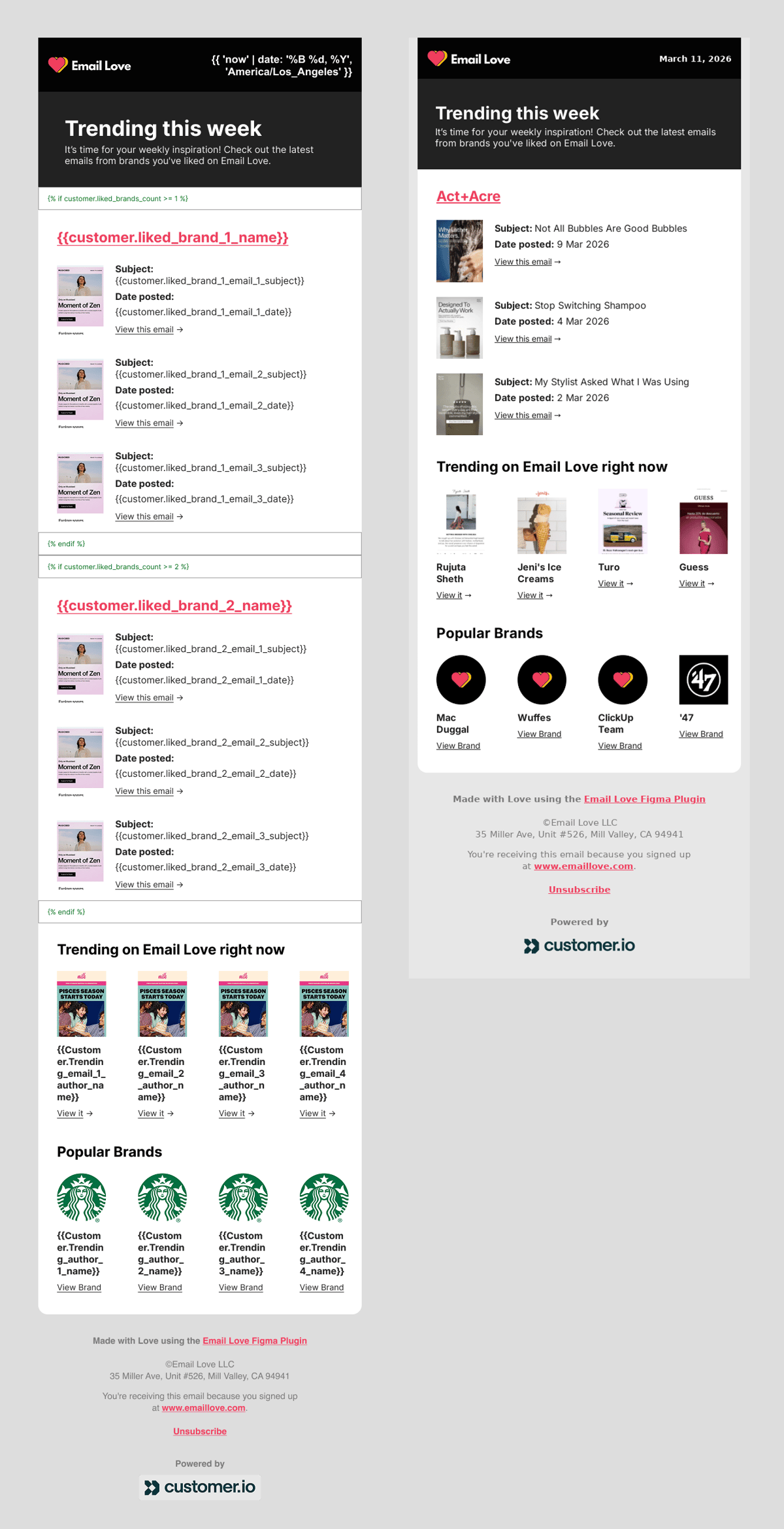
Early results: almost 39% open rate and close to 10% click-through rate. It’s a smaller, engaged segment, but the content is highly relevant because it’s built on real user behavior and real-time site data.
More importantly, this data unlocks campaigns we simply couldn’t send before:
- Weekly digests personalized with each person’s favorite brands
- Milestone celebrations like “You just liked your 100th email!”
- Re-engagement flows for users who haven’t visited in a while
All of it runs automatically. Every night.
What Else Claude Has Changed for Us
The Customer.io integration was the biggest build, but Claude has become a daily tool across the business.
Automated newsletter signups. We curate emails from thousands of brands on emaillove.com. I’ve personally signed up for over 5,000. Now I tell Claude Cowork to find 100 electronics brands, check which ones we already have, and sign up for the rest. Hours instead of days.
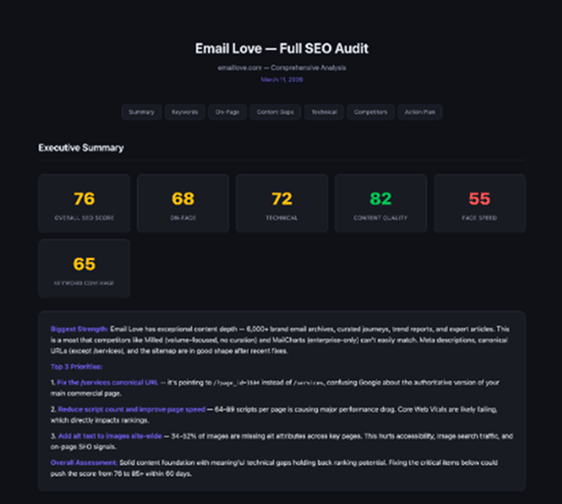
SEO audit and fixes. Claude analyzed our site’s SEO, surfaced issues with a scored report, and then made the improvements. I’m not an SEO expert, so I can’t vouch for every change — but the analysis was thorough and we’ll track the impact.
Help docs from YouTube transcripts. Our help docs live in Notion. Claude Cowork connects to Notion directly via MCP, analyzed our existing docs for gaps, then used our YouTube tutorial transcripts to write new content and fill the holes.
Financial dashboard. I uploaded our Gumroad sales data and Claude built an interactive dashboard for MRR, growth trends, and product performance. We were evaluating a paid product for this. Instead, we built exactly what we needed.
Competitive analysis. I point Claude at a competitor and get a structured breakdown of features, positioning, and overlap. It’s now a regular part of how we plan our roadmap.
The Honest Caveats
I’d be doing you a disservice if I skipped the rough edges.
When Claude first built the WordPress-to-Customer.io integration, it didn’t set things up securely. I had to specifically ask: What authentication is in place? How is data being transmitted? What happens if someone finds the API endpoint? Once I asked the right questions, Claude rebuilt it properly.
That’s the key insight. Claude can build things the right way, but you need to know enough to push it there. You need the instinct to ask “Is this secure?” and “What are the risks?” If you don’t have that background, get a developer to review anything that handles user data.
The combination that works is domain expertise plus AI. Knowing what needs to be built and why, even if you can’t write the code yourself. That’s where the leverage is.
What This Means for Small Marketing Teams
I don’t think AI coding tools are going to replace enterprise software. Nobody’s going to vibe-code the next HubSpot or Salesforce.
But the custom stuff — the data pipelines, internal dashboards, niche automations that are too specific for any off-the-shelf product — that’s where this changes the game for small teams. The integrations you’ve been waiting on engineering to prioritize. The internal tools you’ve been managing in spreadsheets. The personalization you know would work but couldn’t implement.
For a two-person company trying to compete with teams 10x our size, this is a real shift. We went from “we can’t build that” to “we built that last week.”
We’re all developers now, I suppose.
Much love,
Andy

Andy has spent two decades building email programs for brands and agencies, and now co-runs Email Love: the inspiration gallery of 480,000+ emails and the Figma plugin that lets teams design, build, and export production-ready email without leaving their design file. He writes about email design systems, production workflow, and where the industry is heading.

Customer.io delivers more impact from every message–unifying data, messaging, and AI into one platform so every customer interaction gets smarter over time. We help teams build personalized campaigns across email, SMS, push, in-app, and webhooks, using their own first-party data to reach the right people with the right message at the right moment. AI is built into the platform to remove the grunt work, letting marketers focus on strategy, not setup. Over 9,000 brands trust us to power their messaging.