On this page · 5 min read
After reviewing thousands of emails, I’ve noticed some common patterns in how brands handle unsubscribes, and there’s definitely room for improvement.
Here’s the thing: your unsubscribe link is one of the most important elements in your email. Get it right, and you’ll maintain better deliverability and a healthier list. Get it wrong, and you’ll see increased spam complaints and frustrated subscribers.
Let’s walk through what I see brands doing (that doesn’t work) and what you should be doing instead.
Three Common Unsubscribe Mistakes
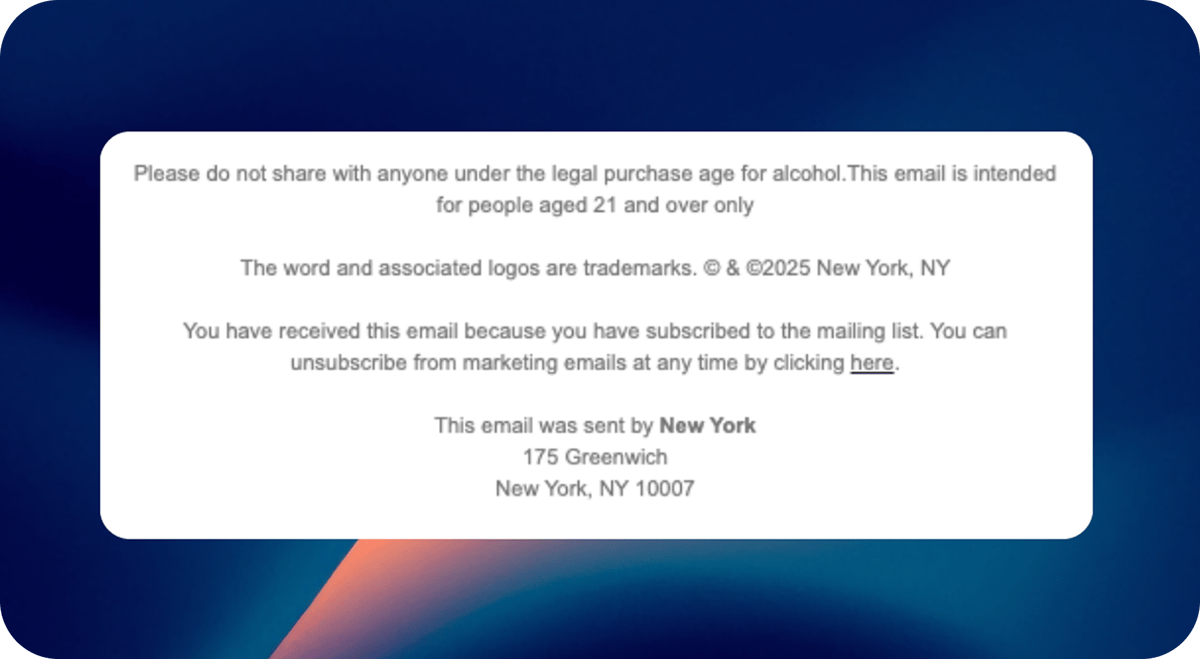
1. Hiding the Unsubscribe Link in Legal Text
I see this all the time: a footer with a paragraph of gray text containing terms, conditions, your physical address, and somewhere buried in there is the word “unsubscribe” in the same tiny font as everything else.
The problem? If someone wants off your list and can’t easily find the unsubscribe link, they’re much more likely to hit the spam button instead. That hurts your sender reputation.
2. Unsubscribe Links That Don’t Work
Broken unsubscribe flows are still surprisingly common. Whether it’s a link that errors out or a process that doesn’t actually remove someone from the list, this creates a terrible experience and leads to spam complaints.
Here’s the thing: this can happen to anyone. I recently discovered our own newsletter had a broken unsub merge tag in one of our campaigns. Fortunately, I could still see who clicked the link and removed them manually, but it was a wake-up call. Now I test the unsubscribe link before every single send. Consider this your reminder to do the same.
3. The Unsubscribe Confirmation Email
Some email platforms offer the option to send a confirmation email after someone unsubscribes. I’d recommend skipping this. If someone just told you they don’t want your emails, sending them another email defeats the purpose. This personally drives me crazy!
How to Actually Do Unsubscribe Right
Okay, rant over. Here’s what you should be doing instead:
Make It Clearly Visible
Your unsubscribe link should be instantly recognizable in your footer. Separate it from your terms and conditions. Use a different color if needed. Add some spacing. The goal is for someone to glance at your footer and immediately know where to click.
Don’t do this:
© 2025 Your Company. All rights reserved. 123 Main St, Anytown, USA.
View in browser | Privacy Policy | Unsubscribe | Terms of Service
Do this instead:
© 2025 Your Company | Privacy Policy | Terms of Service

Don't want these emails? Unsubscribe
Hyperlink the Word “Unsubscribe”
This sounds obvious, but you’d be surprised how many brands hyperlink phrases like “click here to unsubscribe” instead of just hyperlinking the word “unsubscribe.”
When you make people read a sentence to figure out where to click, you’re making it harder than it needs to be. Just link the word everyone is looking for.
Remove Them Instantly
When someone clicks unsubscribe, remove them from your list immediately. Don’t send a confirmation email (see pet peeve above). Just send them to a landing page that says “You’ve been unsubscribed” and be done with it.
If you want to ask why they unsubscribed, fine—put a quick optional survey on that landing page. But don’t make it required, and don’t expect great data. At this point, they’re already out the door.
Connect to Inbox Provider Unsubscribe Features
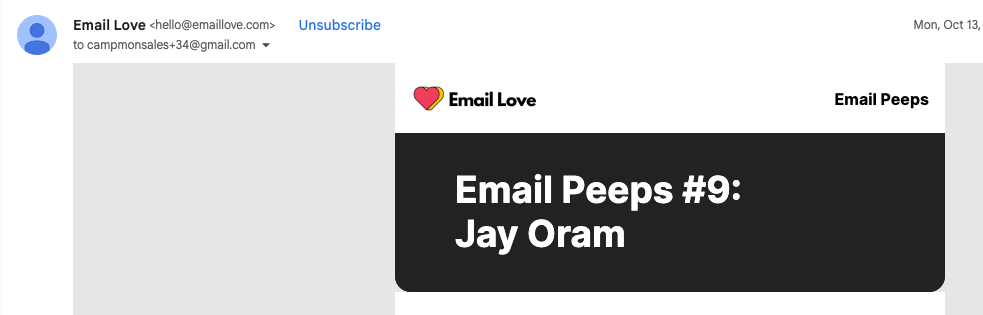
This is the one that separates the amateurs from the pros: Gmail, Yahoo, and other major inbox providers have one-click unsubscribe options that appear right next to the from address at the top of the email.
You need to set this up properly using List-Unsubscribe headers. When you do, subscribers can unsubscribe without even scrolling to your footer. It’s the easiest possible experience.
Most modern ESPs (like Mailchimp, Klaviyo, Braze, and Iterable) support this automatically, but it’s worth double-checking your settings. Some platforms require you to enable it in your account settings or may only support it for certain email types. If you’re using a smaller or custom email solution, you might need to manually add the List-Unsubscribe header to your email templates.
The best way to verify it’s working? Send yourself a test email and open it in Gmail. Look for the unsubscribe link next to your sender name at the top of the email. If you don’t see it, check your ESP’s documentation or reach out to their support team.
Here’s what it looks like in Gmail: there’s an “Unsubscribe” link right at the top next to your sender name. That’s what you want.
Why This Actually Matters
Look, I know I’m preaching to the choir here. Most email marketers get this. But I’ve seen plenty of situations where someone in upper management (who isn’t deep in the email weeds) suggests hiding the unsubscribe link to “keep more people on the list.”
Here’s how to explain why that’s a bad idea:
If someone doesn’t want your emails, they’re getting off your list one way or another.
They’ll either:
- Click unsubscribe (if you make it easy)
- Mark you as spam (if you make it hard)
- Just stop opening your emails forever (worst-case scenario)
Only one of those options doesn’t hurt your sender reputation. Making unsubscribe difficult doesn’t keep engaged subscribers. It just turns disengaged people into spam complaints, which tanks your deliverability for everyone else who actually wants your emails.
The brands that make unsubscribe easy actually have better engagement rates because they’re left with subscribers who genuinely want to hear from them. A smaller, engaged list will always outperform a larger, disengaged one.
When you’re making the case to leadership, frame it this way: easy unsubscribes protect your ability to reach the customers who matter most.
The Bottom Line
Make your unsubscribe link:
- Clearly visible and separated from other footer text
- Hyperlinked on the actual word “unsubscribe”
- Connected to the inbox provider’s one-click unsubscribe features
- Functional (test it regularly!)
- Instant (no confirmation emails needed)
Do this right and you’ll reduce spam complaints, improve deliverability, and maintain a healthier, more engaged list. Everyone wins.
Look, I get that it hurts to see people unsubscribe from your list. Every week, people unsubscribe from our newsletter, and I can’t say it doesn’t sting a little. But think about it from your own perspective. We all get tired of receiving emails from certain companies, and when it comes time to unsubscribe, how would you want to be treated? Make it easy, make it respectful, and move on.
Much love,
Andy

Andy has spent two decades building email programs for brands and agencies, and now co-runs Email Love: the inspiration gallery of 477,000+ emails and the Figma plugin that lets teams design, build, and export production-ready email without leaving their design file. He writes about email design systems, production workflow, and where the industry is heading.

Customer.io is an AI-powered customer engagement platform designed for organizations to create personalized customer journeys that engage, convert, and scale. Orchestrate messages across all channels, including email, in-app, SMS, push, and webhooks. Over 8,000+ companies, including Notion, LESMILLS+, and Angi, rely on Customer.io to power their messaging needs.