

On this page · 4 min read
I have a confession: we’ve been collecting subscriber data for months and doing absolutely nothing with it.
Sound familiar? I bet you’ve got signup forms asking for job titles, company sizes, or interests that just sit there collecting digital dust. It’s like having a gym membership you never use, except worse, because at least the gym isn’t cluttering up your email platform with unused segments.
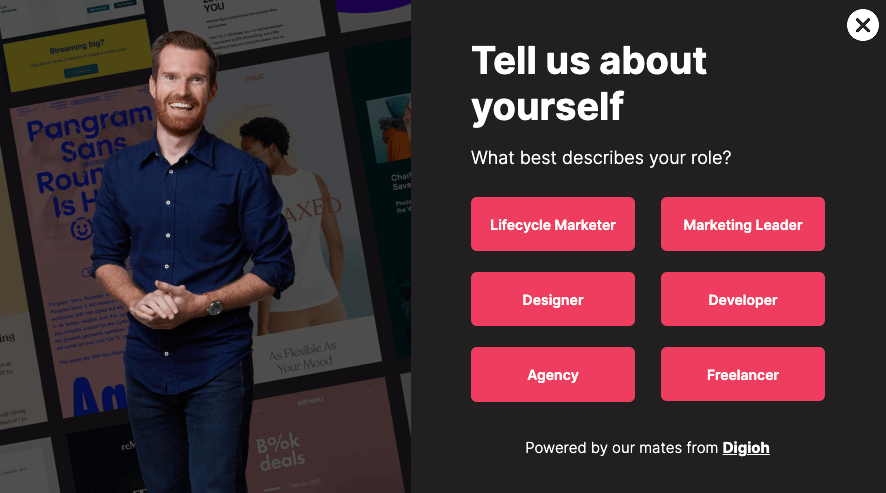
A couple of months ago, we partnered with Digio to implement a new pop-up form that asks, “What best describes your role?” when someone signs up for our newsletter. The options are Lifecycle Marketer, Marketing Leader, Designer, Developer, Agency, or Freelancer. People have been dutifully clicking those options and entering their email addresses, but we hadn’t done a thing with that data.
Until now.
The Problem We All Have (But Don’t Talk About)
Here’s the thing about collecting data you don’t use: it’s actually worse than not collecting it at all. You’re asking people to take an extra step in your signup process, creating friction, and then… nothing. No better experience, no relevant content, no acknowledgment that they told you something about themselves.
It’s like asking someone their name at a party and then calling them “hey you” all night.
When I dove into our segments, here’s what I found:
- 105 people identified as Lifecycle Marketers
- 114 said they’re Designers
- 65 are Freelancers
- 25 work at Agencies
- 16 Developers
That’s real people who took the time to tell us about themselves, expecting (reasonably) that we’d do something useful with that information.
The Solution: Actually Use the Data You Collect
So I decided to stop being that marketer who hoards data and start being one who uses it. The first step was creating segments for each role—pretty straightforward stuff in any email platform.

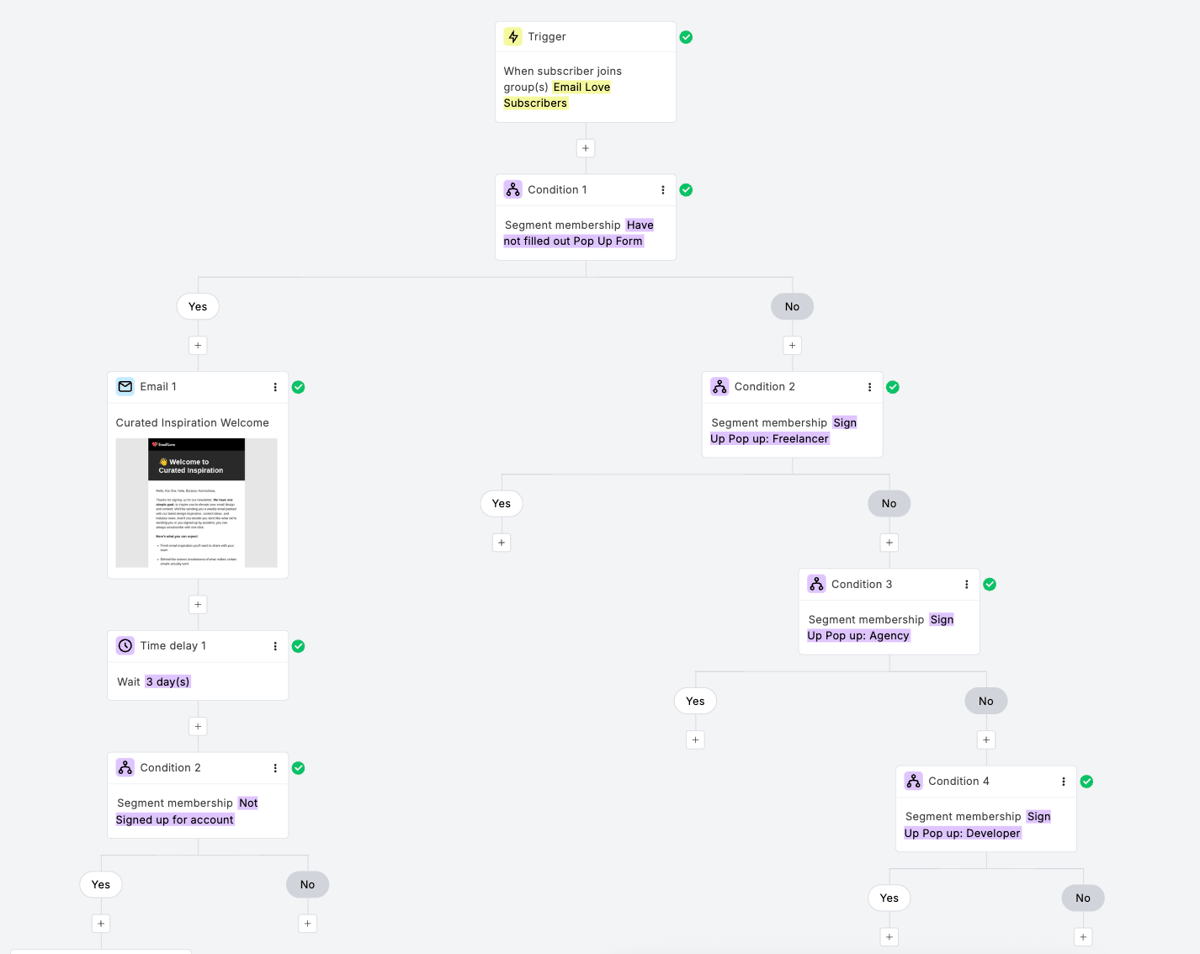
But here’s where it gets interesting: instead of just having one generic welcome email, I built a conditional automation that sends different welcome messages based on what people told us about their role.
The logic is simple:
- Someone joins our list
- First condition: Did they fill out the popup form?
- If no → Generic welcome email
- If yes → Series of conditions to determine their role
- Role-specific welcome email gets sent
What Personalization Actually Looks Like
This isn’t about changing someone’s name in the subject line (though we do that too). It’s about acknowledging what they told us and giving them content that actually matters to their work.
For Designers: I’m pointing them toward emails with exceptional design, visual inspiration, and design-focused resources. Think beautiful layouts, creative use of imagery, and examples that’ll make their own work better.
For Lifecycle Marketers: They’re getting emails that use data effectively, target people throughout different customer lifecycle stages, and showcase smart automation strategies. More strategy, less pretty pictures.
For Freelancers: Content focused on solo practitioners—emails about client communication, project management, and resources specifically valuable for people working independently. I actually have a lot of experience freelancing myself, so I have a few blog posts that might be helpful to this crowd.
You get the idea. Same core Email Love content, but filtered through the lens of what actually matters to each person’s day-to-day work.
The Proof This Works
We actually tested this approach a few weeks ago with our nonprofit segment, and the results were ridiculous: 70% open rate and 20% click-through rate. When you give people content that’s genuinely relevant to their situation, they respond.
That’s what convinced me to stop procrastinating on using our role data.
Beyond Welcome Emails: The Bigger Opportunity
Once you start thinking this way, the possibilities multiply. I’m already planning dedicated email flows for specific segments—maybe a “Freelancer Friday” series with tips for solo email marketers, or designer-focused breakdowns of our best visual examples.
The data you collect once can inform dozens of future campaigns, content decisions, and product developments. But only if you actually use it.
The Bigger Lesson Here
If you’re not going to use the data, don’t ask for it.
Seriously. Go audit your signup forms right now. What are you asking for? What are you doing with those answers? If the answer is “nothing,” either start using it or stop asking.
Your subscribers will respect you more for a simple email signup than a complex form that leads to the same generic experience everyone else gets.
And if you are going to collect data? Have a plan for it before you hit publish on that form. Know what segments you’ll create, what content you’ll personalize, and how you’ll make that extra friction worth it for your subscribers.
Your Turn
What data are you collecting but not using? I bet there’s at least one field on your signup form that’s just sitting there, unused and unloved.
Email me and tell me about it. Or better yet, tell me about a time you actually used subscriber data to create something amazing. I’m always looking for more examples to share (with your permission, of course).
Because at the end of the day, data without action is just digital clutter. And nobody needs more of that.
Much love,
Andy

Andy has spent two decades building email programs for brands and agencies, and now co-runs Email Love: the inspiration gallery of 582,000+ emails and the Figma plugin that lets teams design, build, and export production-ready email without leaving their design file. He writes about email design systems, production workflow, and where the industry is heading.

Customer.io delivers more impact from every message–unifying data, messaging, and AI into one platform so every customer interaction gets smarter over time. We help teams build personalized campaigns across email, SMS, push, in-app, and webhooks, using their own first-party data to reach the right people with the right message at the right moment. AI is built into the platform to remove the grunt work, letting marketers focus on strategy, not setup. Over 9,000 brands trust us to power their messaging.
 Oct 20, 2026 · 8 min read
Salesforce Is Buying Braze. It Got Me Thinking About ESP Migrations.
Read article →
Oct 20, 2026 · 8 min read
Salesforce Is Buying Braze. It Got Me Thinking About ESP Migrations.
Read article →
 Oct 14, 2026 · 11 min read
10 MCP servers for marketers, and how I use them
Read article →
Oct 14, 2026 · 11 min read
10 MCP servers for marketers, and how I use them
Read article →
 Oct 1, 2026 · 9 min read
10 Halloween emails from last year to inspire your campaigns
Read article →
Oct 1, 2026 · 9 min read
10 Halloween emails from last year to inspire your campaigns
Read article →

