On this page · 9 min read
The full session is above. Each section below opens the part of the recording it covers.
Many email teams approve a design in Figma, then rebuild it in their ESP and review it all over again. StreetEasy is removing that second build.
Jake Leffler works on marketing automation at StreetEasy, a New York real estate marketplace and part of Zillow. His team starts with a campaign request. Claude asks a few questions, assembles the email in Figma from roughly 80 approved StreetEasy components, and adds the Iterable logic the campaign needs. The team still reviews the email in Figma and QAs it in Iterable. Nobody has to recreate the approved design.
The word agentic is doing real work here. Claude is not just generating an email. It runs the process. It interviews the requester one question at a time, works out which audience and component set apply, applies StreetEasy’s Iterable catalog logic, builds the email and a campaign-details frame in Figma, and is being extended to open the job in Jira. The Email Love plugin then generates the production HTML. The AI does not write or edit it. Marketers who prefer to assemble emails visually use Email Love Builder on the same component library.
Jake walked through the workflow with us in a live session and built a renter re-engagement email with two personalized listing cards while we watched. This post covers how the system works, what StreetEasy customized, and what still needs a person.
StreetEasy is removing the second build
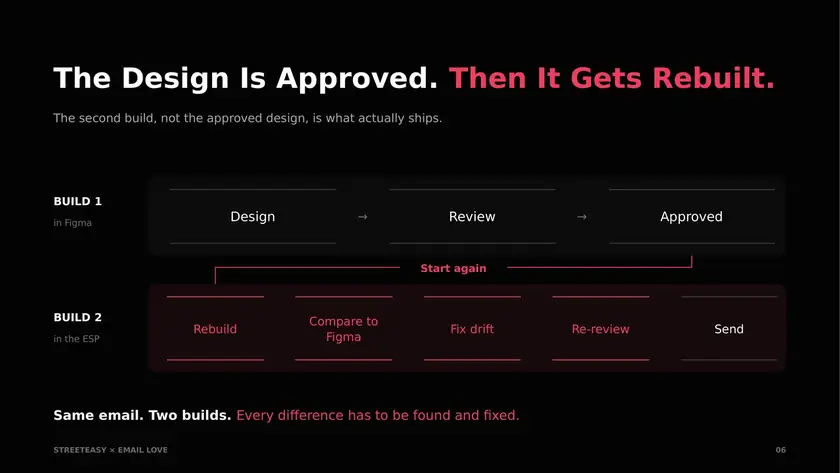
This is the process most teams use before they work with us. A designer builds the email in Figma. The team reviews it there, adjusts the images and copy, and approves it. Someone then rebuilds the same email in a drag-and-drop builder or in HTML. The rebuild usually looks slightly different from the Figma file, so the developer adjusts it, the team reviews it again, and the email goes out.
The rebuild repeats most of the approved design work and adds another fidelity check. Jake spent most of his career in that loop, from pixel-by-pixel Photoshop builds to hand-coded HTML to MJML.
StreetEasy’s workflow removes the rebuild. It has five steps.
- A campaign brief goes into Claude. You can write it there or paste one in.
- Claude assembles the email in Figma. It uses the Email Love skills and the Figma MCP to build from StreetEasy’s approved components.
- The team reviews the email in Figma, the same way it always has. Stakeholders comment there.
- The Email Love plugin exports the code into Iterable, Handlebars included.
- The team QAs in Iterable. Check that the Handlebars renders, send a test, confirm the email looks right across clients.
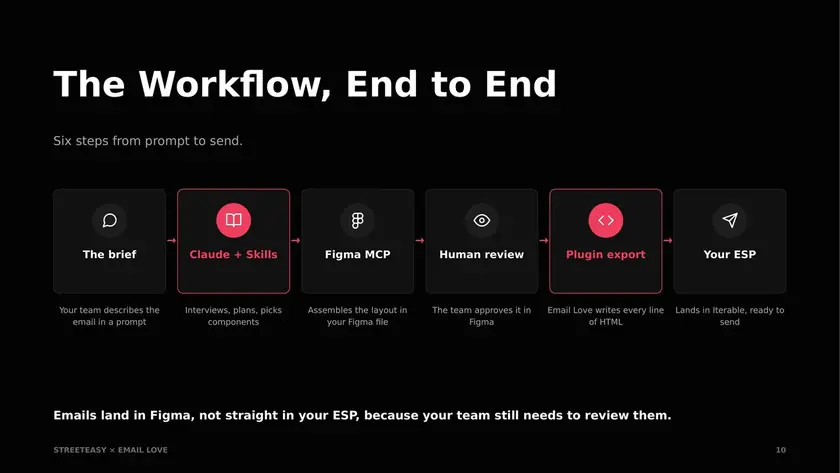
If something changes after export, the team updates it in Figma and exports again. Jake’s reason for keeping Figma in the loop is simple. Having the agent write code straight from a chat can work for a code-centric team, but StreetEasy’s review cycle, stakeholder comments, and new components all live in Figma, and he wanted them to stay there.
The design work has not gone away. The rebuild step has.
The proof: a renter re-engagement email, built live
Jake started the build with one line: build StreetEasy email. The skill asked whether to use an existing Figma file or create a new one, then asked for the persona (renter), whether to include listing cards (yes), the purpose of the email (a re-engagement nudge), which catalog call to use (StreetEasy’s recommendation model), and how many cards to show (two).
Claude created the Figma file and pulled components from the library. In Jake’s testing the same build took about five minutes. During the live session, with screen sharing and a conversation running alongside it, it took closer to twenty, and the finished email arrived as we were wrapping up.
Jake also showed an email he had built just before the call: a step-by-step guide to getting back into renting with StreetEasy, assembled from the design system, with the Handlebars for the recommendation model at the bottom. He exported it from the plugin into Iterable. The template showed user data at the top, listing cards populated from the catalog, and correct stacking on mobile.
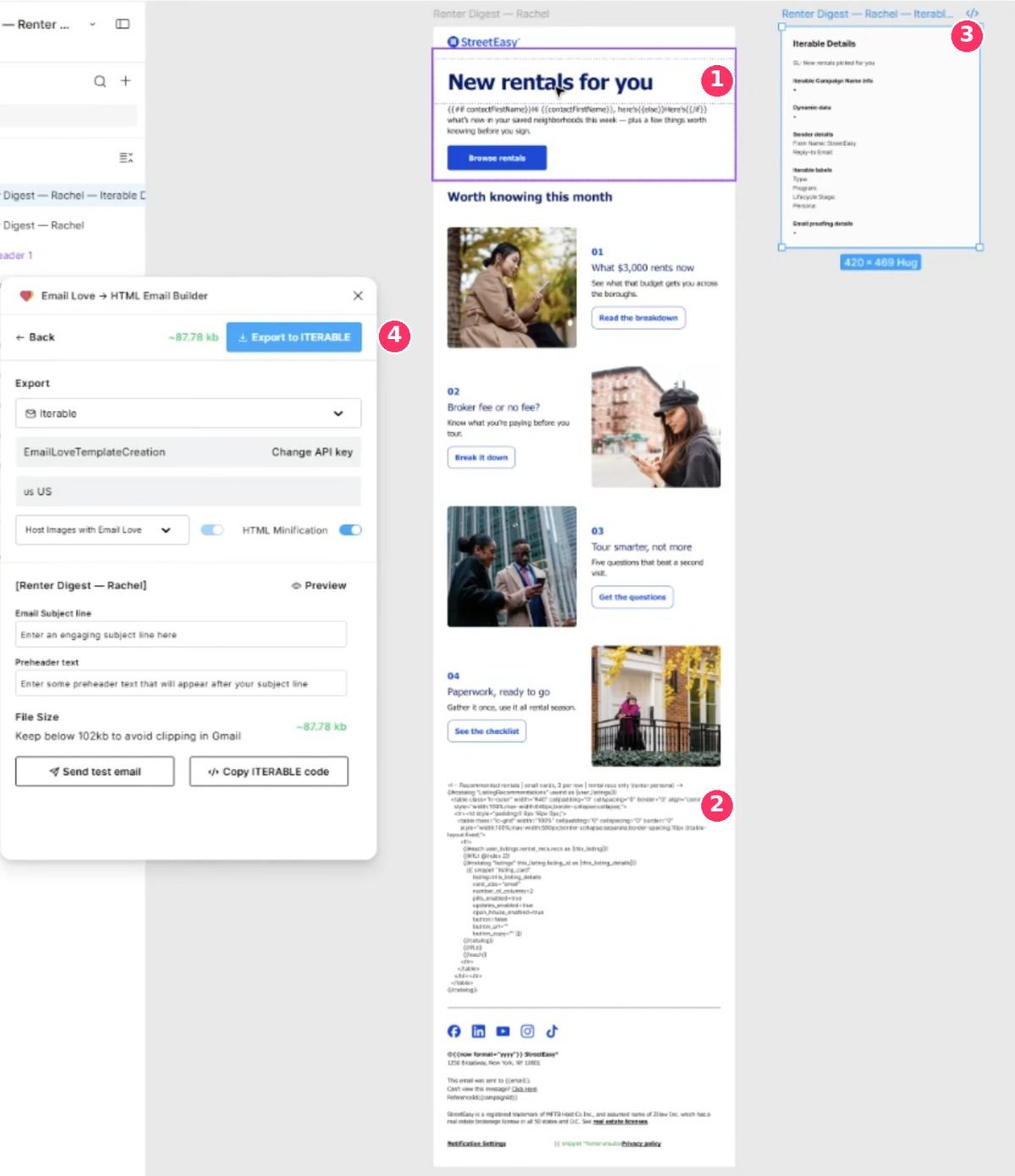
Changes are made by prompting. Jake asked for a shorter headline and the text block in Figma updated within seconds. The first output is not the final email. Someone still edits copy, swaps an image, or replaces a component, and someone still QAs the send. Jake’s view is that it still nets out faster than the thirty or forty minutes it took him to build an email by hand in Figma. He ran Claude Opus for the demo; in his testing, stronger models left less to fix afterward.
What StreetEasy uses
Three things, all available to any team.
- An AI agent connected to the Figma MCP. StreetEasy uses Claude. ChatGPT, Codex, and Cursor also work with the official Figma MCP.
- Email Love’s skills. Free Markdown files that teach the agent to build emails in Figma, audit templates, generate a design system, and write ESP templating for Iterable, Braze, and HubSpot. They are on GitHub for Claude and Codex, with a ChatGPT plugin.
- The Email Love Figma plugin. The export step. It turns the Figma design into production email code and sends it to the ESP. Without it, the email still has to be rebuilt. Plans start at $19 per user per month.
The guardrails that make it dependable
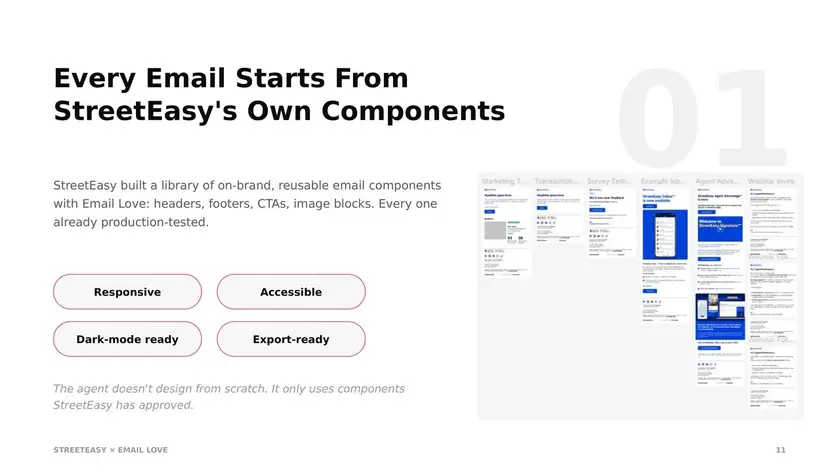
We built StreetEasy’s email design system about a year ago. It has around 80 components, with responsive layouts, dark mode, fonts, and colors set at the component level. The workflow instructs the agent to assemble those approved components and applies StreetEasy’s own guardrails on top. That substantially reduces the risk of off-brand layouts and dark mode errors, and it is why Jake’s attention has moved from fixing rendering problems to improving the workflow. The design system is the source of truth the agent builds from, the same way an API is for an application. More on that idea in Your Email Design System Is About to Become an API.
Two of the guardrails are StreetEasy’s. The skill carries the design guidelines the creative team wrote, so a request that drifts outside the brand gets pulled back to it. And the system is split by audience. StreetEasy sends to renters, buyers, and agents, so the skill asks which persona an email is for and limits the agent to that persona’s components.
The third guardrail is that the agent does not generate or edit the production HTML. The plugin does, through its MJML-based export. This came up in the Q&A: why not have Claude write the email code directly from the Figma design? Jake has seen why. Even the higher-end models hallucinate, and he has watched one wrap comments in Handlebars because it did not understand it was writing Handlebars inside an email. Keeping the agent to assembly, and the HTML in the plugin, is faster and more predictable.
There is a team benefit too. Jake is on a small operations team inside a much larger company, with stakeholders who want more involvement in campaigns.
“I’m still not giving more people access to Iterable. But more people can now build emails, start their projects with assets already created before they even come to us to kick off a project. So you’re not starting from ground zero every single time.”
Jake Leffler, StreetEasy
If you do not have a design system yet, the free skill will build one from your existing emails. We covered that in how to build an email design system with Claude, and you can start from our free Ultimate Email Design System on the Figma Community.
How Jake customized the skills
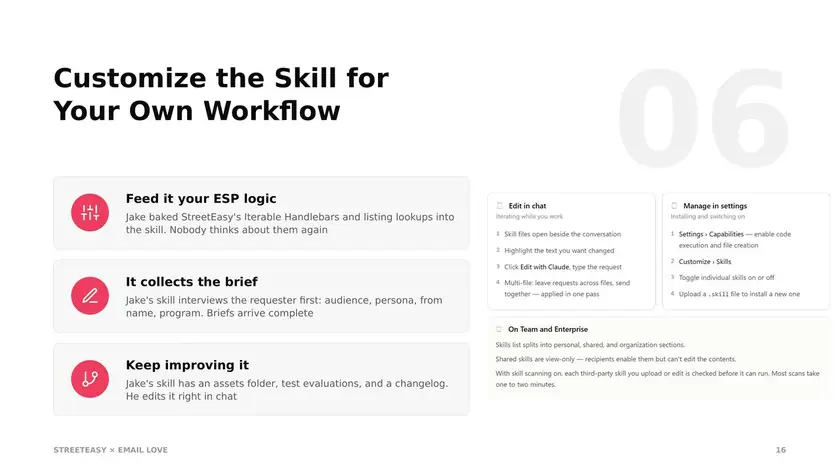
Our skills are a starting point. Every company runs email a little differently, so they are meant to be edited. For StreetEasy, the Iterable Handlebars skill was the one that mattered most.
“Feeding the agent the ability to understand Handlebars at a base level was a game changer for us. But then you can go in and customize it and take it to a whole new level by injecting your own rules, logic, anything that you’re using for your ESP specifically.”
Jake Leffler, StreetEasy
Catalog lookups and listing cards. Listing cards are how people get back onto StreetEasy’s site, so Jake added the exact logic for calling Iterable catalogs to pull live listing data into an email, including what to do when a user only has one listing ID. That logic is specific to StreetEasy and will never be in the base skill.
One question at a time. The skill asks the requester one thing at a time instead of presenting a wall of questions: new file or existing link, which persona, listing cards or not, what the email is for. The requester makes the decisions. The agent solves for the prompt.
A campaign-details frame. Next to each email, Claude adds a frame in Figma with the proposed subject line, pre-header, and the labels and campaign nodes StreetEasy tracks in Iterable, so anyone reviewing in Figma sees the campaign details alongside the design.
Project management, next. Jake plans to have the skill update the Jira ticket with the Figma link, tag the right people, and eventually start the whole project from a single request. Jira and Monday.com are both on the list.
How he built it. Skills are Markdown files in a folder. Jake used ours as the base, pasted in StreetEasy’s catalog calls, gave Claude the context, and had Claude update the skill file. His two warnings: keep the skill focused, because one that tries to do everything runs into time limits, and keep it maintained.
“Your skill is almost like a SaaS program. You’ve built a service that you’re providing to your company, and you can’t just let it get stale. If rules or governance inside your company change, you’ve got to update those docs, because AI can’t reason against that. It’ll just keep building the same thing unless you give it that context.”
Jake Leffler, StreetEasy
What changed for StreetEasy
Emails produced through this workflow no longer need a manual rebuild in Iterable, which removes the step that usually introduces drift between the design and the send. Handlebars comes out of the export. Dark mode, fonts, and layout are handled once, in the design system. More people at StreetEasy can start an email without access to Iterable. The rollout is still in progress and Jake has further phases planned, but the shape of the workflow is set.
We asked Jake whether this is the end of email design.
“I’m not touching raw HTML or even raw MJML as much anymore. I’m doing a lot more workflow implementation, and I’m able to spend more time thinking through the cooler parts of the email. I really like improving on the listing cards, because that has to be a custom solution for our needs: the if-then statements, the Handlebars logic, hiding and showing different content based on the user, diving more into personalization. I don’t think my job is dead. I think my job is transforming into something a little bit more custom, tackling personalization.”
Jake Leffler, StreetEasy
The design work has not gone away. The rebuild step has.
Where to start
- Connect your AI tool to the Figma MCP. Claude, ChatGPT, Codex, and Cursor all work. Figma’s setup docs cover it.
- Install the free Email Love skills. They are Markdown files, and you can ask your AI to install them for you.
- Build the design system first. Then build emails in Figma from it and export them with the Email Love plugin.
The full setup guide, with instructions for Claude Code, Claude.ai, Cowork, and Codex, is at help.emaillove.com.
Already have an email design system in Figma? Install the free skills and use them to build your next campaign.
Still working from scattered templates? Book a call and we will help turn them into a reusable system first, as we did for StreetEasy.
Thanks to Jake Leffler for sharing the workflow. You can connect with him on LinkedIn or watch the full session on YouTube.
Much love,
Andy

Andy has spent two decades building email programs for brands and agencies, and now co-runs Email Love: the inspiration gallery of 566,000+ emails and the Figma plugin that lets teams design, build, and export production-ready email without leaving their design file. He writes about email design systems, production workflow, and where the industry is heading.

Customer.io delivers more impact from every message–unifying data, messaging, and AI into one platform so every customer interaction gets smarter over time. We help teams build personalized campaigns across email, SMS, push, in-app, and webhooks, using their own first-party data to reach the right people with the right message at the right moment. AI is built into the platform to remove the grunt work, letting marketers focus on strategy, not setup. Over 9,000 brands trust us to power their messaging.