On this page · 11 min read
Until pretty recently, most of my AI use looked the same. I’d work out a segment or plan an automation with Claude, then go into our ESP and build it myself. And every time I started a new chat, I’d re-explain what we decided in last week’s meeting.
That’s changed a lot in the last few months. Most of the tools marketers use every day now have an MCP server, and I run a growing share of Email Love’s marketing from inside Claude.
MCP stands for Model Context Protocol. It’s an open standard that lets an AI assistant connect to another tool, read from it and, if you allow it, make changes there. Claude is only as useful as what it can reach, and MCPs are how you give it more to reach. We explained it in more detail when we launched the Email Love MCP.
These are the ten I’d recommend to anyone working in lifecycle or email marketing, including one I’m still figuring out.
Your ESP probably has an MCP now
Whatever ESP you use, there’s a good chance it has an MCP server by now. Customer.io, Braze, Iterable and Klaviyo all do. More and more, I use our ESP through Claude instead of its interface.
We use Customer.io for Email Love (they also sponsor Email Love at the moment, so a big thank you to them), and these days I manage it more and more through their MCP. It’s faster than clicking around the UI, but the bigger benefit for me is that I end up doing work I wouldn’t have bothered with before.
Most of what I do is analysis. I’ll ask Claude how our list grew and where the new subscribers came from, look at trends across a run of campaigns instead of opening them one at a time, or check how each of our automations is performing. That used to mean an afternoon of exports and spreadsheets, and now it’s a quick conversation.
I also use it to get work into Customer.io. When I’ve built an email with the Email Love Figma Plugin, I export it straight to Customer.io using the plugin’s integration, and Claude applies that template to the right campaign or automation for me. And when I’ve mapped out an automation in Notion, Claude can read that plan and build the automation in Customer.io, which I review before turning it on.
What you can do varies by ESP, so it’s worth checking yours before you plan around it. Customer.io’s has to be switched on by an account admin, and there’s a separate setting before it can edit live data. It can never have more access than you do.
Braze’s remote server is in early access. It can create email templates and content blocks, but it doesn’t return user-level PII and its Canvas tools are read-only for now. Iterable’s is in beta and read-only by default, with writes and sends turned on separately.
Klaviyo’s is hosted and connects with your Klaviyo login. It covers campaigns, flows, profiles and reporting, and you can connect it in read-only mode if you just want answers.
My advice is to start read-only, get comfortable with what it pulls back, then turn on writes once you have a good use case and fully understand how it works.
The Email Love MCP brings real emails into the conversation
The Email Love MCP connects Claude to our library of 528,000+ marketing emails from 8,500+ brands, along with lifecycle journeys and brand insights like send timing, frequency, subject line patterns, and which ESP a brand uses. Here are some of the ways people use it.
The most common is competitor research. You can ask Claude what a competitor has sent recently, how often they email, which days and times they send, and how their subject lines compare to yours, and it answers with the actual emails linked back to the source.
It’s also useful for creative work. Claude can pull emails from brands you admire, or from the brands a client says they love, and use them as references for new designs. With the Figma MCP and the Email Love skills connected, it can go from that inspiration to a first version of your own email in Figma.
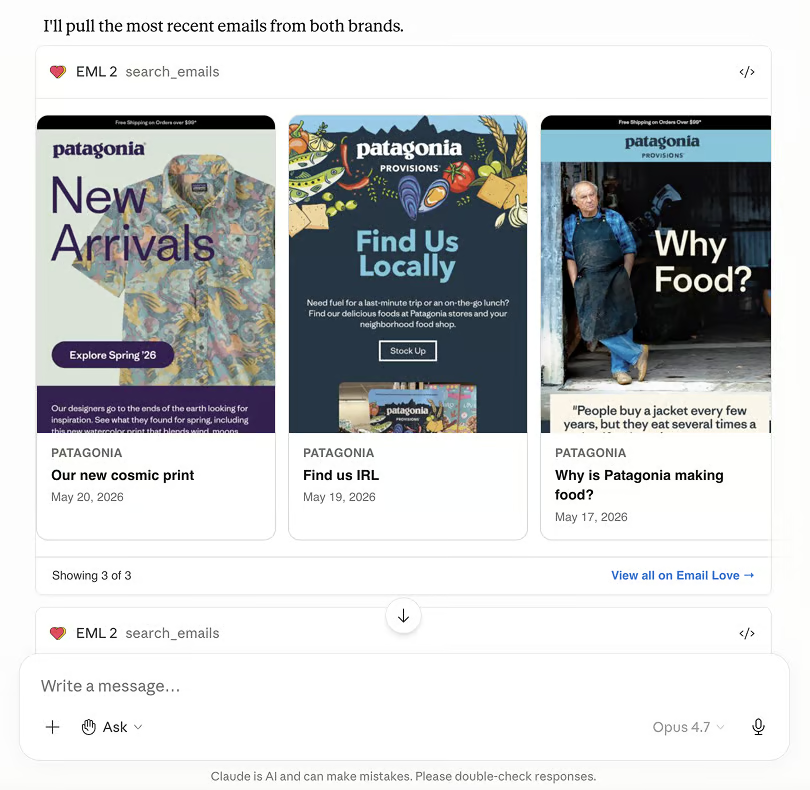
Kimberley Trotz, Director of Operations at Arcady Media, shared how her agency uses it to onboard new clients. Clients often know which brands they like but not what they want, and it can take several rounds of design before everyone realizes they were picturing something different. Her team connected the Email Love MCP to Claude, and now their designers apply the client’s brand guide to real inspiration emails and journeys to show what’s possible before anyone starts designing.
“For me, that’s where it’s been most useful: getting clear on the design direction before the team spends hours designing and revising.”
Kimberley Trotz, Arcady Media
Before you build a flow, you can have Claude look at how other brands handle the same one. It can walk through a brand’s welcome, abandoned cart or win-back emails stage by stage, including the timing between sends, or compare what five brands in your category offer in their welcome series.
Claude can also pull the full HTML of any email, which is handy for briefing your team on a layout or seeing how a brand builds something like a product grid or footer. And if you follow brands or save collections on Email Love, it can read those too, so asking what the brands you follow sent this week works as a quick competitor roundup.
If a brand you care about isn’t in the library yet, you can ask Claude to request it. Our signup agent subscribes to the brand, and its emails start showing up in the library as it sends them, usually within a few days.
It’s free with an Email Love account. Apart from brand requests, every tool is read-only, so it can’t change anything in your account.
Figma, with the Email Love skills
Figma’s MCP can now write directly to the canvas, so Claude can build real designs in your files using your existing components and variables. On its own, that gets you a design. It doesn’t get you an email that will survive Outlook.
That’s what skills are for. A skill is a set of instructions Claude loads when it needs them. Our free Email Love skills tell it how to structure an email so it exports cleanly through the Email Love plugin and follows email best practices.
We’ve used them to build full email design systems from a brand’s existing emails, and to generate 30+ lifecycle emails for Email Love in Figma. The MCP gives Claude access to Figma, and the skills are what make the output usable.
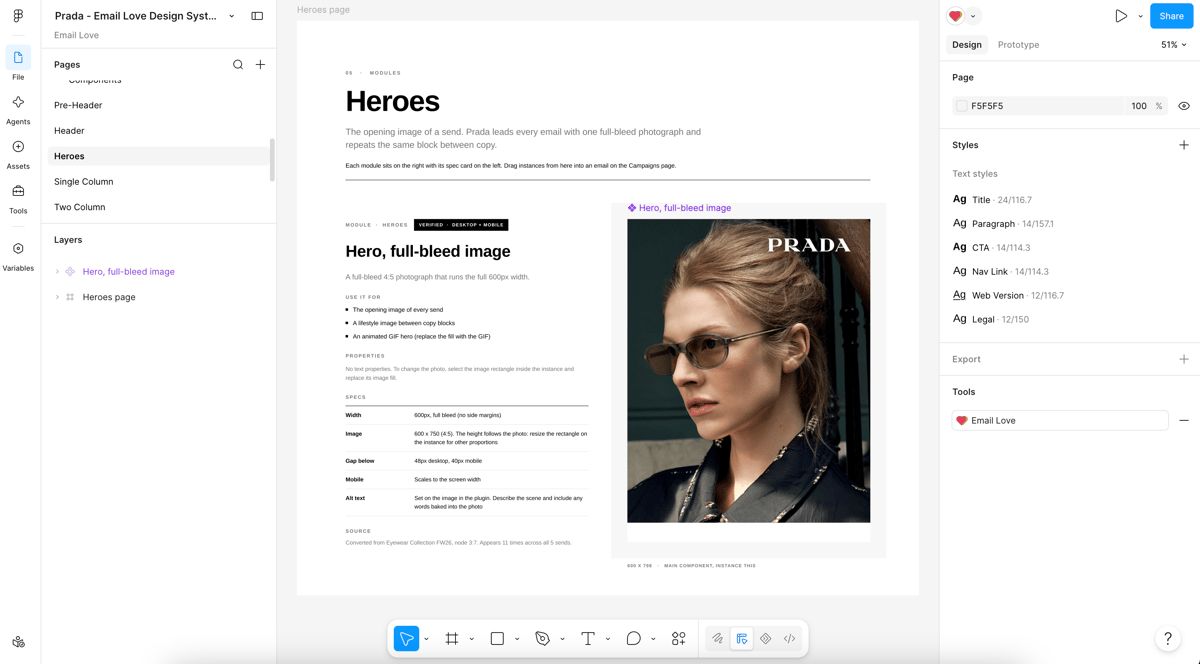
(Check out this example Prada design system)
One thing to know: writing to the canvas needs a Full seat in Figma. Dev seats can still read designs.
Notion is where the work gets written down
Working inside Claude is great, but conversations end up buried in a sidebar. You want somewhere the work gets written down and your team can see it, and for us that’s Notion.
With the Notion MCP connected, Claude documents processes as we figure them out, stores data in databases, and keeps a record of what we’ve done that I can share with the team. We’ve also been building a daily brief that pulls our traffic, revenue and sales numbers into a Notion page each morning.
Notion’s MCP is hosted at mcp.notion.com, you connect with your Notion login, and it can search, read, create and update pages and databases.
Granola gives Claude the meeting context
I used to start a lot of chats by retyping what happened in a meeting. Now I take notes in Granola and Claude reads them through the Granola MCP.
After a call I can ask Claude to turn the decisions into a plan, draft the follow-up, or start on the work we agreed to. It’s the quickest way I’ve found to get from a meeting to actually doing something.
The Granola MCP works on the free plan, but you can only query notes from the last 30 days. Paid plans let Claude look further back.
Ahrefs for SEO, with a second connection to act on it
The Ahrefs MCP lets Claude pull your rankings, see where competitors are gaining ground, and find keyword gaps using your own Ahrefs data. I’ll ask what changed for us this month, or which pages a competitor has started ranking for, and get an answer in a few seconds.
The useful part is acting on it. Ahrefs’ MCP only reads data, so to have Claude update your website based on what it finds, you need a second connection to wherever your site lives, like your CMS or the site’s code. With both connected, Claude can spot a problem in Ahrefs and fix the page in the same conversation.
You’ll need an Ahrefs Lite plan or higher, and each request uses API units from your plan.
Google Analytics, if you use it
Full disclosure, we use Plausible at Email Love rather than Google Analytics, so I haven’t used this one myself. But most marketers I talk to are on GA, and it would be a strange list without it.
Google has an official MCP server that runs standard, funnel and realtime reports on your GA4 data. It’s a good fit for a daily report on what happened yesterday, for spotting a traffic drop before someone asks you about it, or for getting answers without fighting the GA interface (which I’ve never liked).
Be ready for the setup. Google’s server is labeled experimental and runs on your own machine, and you’ll need to enable two APIs in a Google Cloud project and set up credentials. A few third-party services host it for you if that sounds like too much. Once it’s running, the daily report is the easy part.
Buffer for scheduling social posts
The Buffer MCP lets Claude add posts to your Buffer queue across whichever social channels you’ve connected. You can turn a blog post or newsletter into a set of posts in Claude, edit them, and have Claude schedule them without opening Buffer.
It connects with an API key you create in Buffer rather than a normal login, so setup takes a couple of extra minutes.
Canva, which I haven’t cracked yet
I haven’t got the Canva MCP working as well as I want. My plan was to have Claude write social posts from data on emaillove.com, use Canva to mock up the designs, then send them to Buffer to schedule. I tried it a few times and wasn’t happy with the quality of the designs.
I still think it’s worth trying. My guess is the results would be a lot better with a few well-designed templates for Claude to work from, rather than asking it to design from scratch. If you already have good templates, it might work for you straight away.
I also think skills could make a big difference here, the same way the Email Love skills do for Figma. Canva has published its own official Claude skills that apply your brand kit when Claude creates designs, and that’s the next thing I want to try.
Zapier fills the gaps
Not every tool has an MCP yet, and that’s where Zapier comes in. The Zapier MCP lets Claude use actions from the apps Zapier connects to, so if a tool has a Zapier integration, Claude can probably work with it.
Events and webinars are a good example. If registrations come in through a form or webinar tool that doesn’t have its own MCP, Claude can pull the registrant list through Zapier, check who’s already a subscriber, and add everyone else to the right list in your ESP. After the event, it can do the same with attendees and no-shows so each group gets the right follow-up.
Surveys work the same way. Claude can read the latest responses from your form tool, summarize what people said, and tag respondents in your ESP based on their answers, which would otherwise be a lot of copying and pasting.
It also helps when a one-off job turns into a regular one. If you find yourself asking Claude to do the same thing every week, it can set that up as a Zap through the MCP, and later look at the run history when something seems off.
How they work together
Each of these is useful on its own, but the real benefit shows up when you chain them. Here’s roughly how an email goes from idea to sent for us.
It starts with a call, which Granola records. Claude reads the notes and writes up a plan in Notion. Then it uses the Email Love MCP to look at what other brands send for the same moment, and adds that to the plan.
From there, Claude builds the email in Figma from our design system using the Email Love skills. Once I’ve reviewed it, it goes to Customer.io, and Claude updates the campaign page in Notion with what shipped and when.
None of those steps is new. What’s new is that I’m not the one carrying information between them.
A few things to know before you connect everything
Start with two or three. Every MCP you connect adds tools Claude has to choose between, and with too many it gets slower and makes worse choices. Iterable’s server alone has over 100 tools with everything turned on.
Set permissions on purpose. Most of these let you choose between read-only and read-write, and some, like Customer.io, need an admin to allow edits. Start read-only on anything that touches customers.
Check your plans, too. Ahrefs needs Lite or higher, and Figma needs a Full seat to write to the canvas.
And review anything that sends or publishes before it goes out. It’s still your list and your brand.
Where to start
If you work in email, I’d start with your ESP and the Email Love MCP. Between them, Claude can see what you’ve sent, see what everyone else is sending, and help you do something about it.
The Email Love MCP is free with an Email Love account, and setup takes a couple of minutes. If there’s an MCP you think should be on this list, send me a message on LinkedIn. I’d love to hear what you’re using.
Much love,
Andy

Andy has spent two decades building email programs for brands and agencies, and now co-runs Email Love: the inspiration gallery of 543,000+ emails and the Figma plugin that lets teams design, build, and export production-ready email without leaving their design file. He writes about email design systems, production workflow, and where the industry is heading.

Customer.io delivers more impact from every message–unifying data, messaging, and AI into one platform so every customer interaction gets smarter over time. We help teams build personalized campaigns across email, SMS, push, in-app, and webhooks, using their own first-party data to reach the right people with the right message at the right moment. AI is built into the platform to remove the grunt work, letting marketers focus on strategy, not setup. Over 9,000 brands trust us to power their messaging.